TTech OneStop · Safety and environment

Environment

Every spill, exceedance or complaint reported with its facts and photos, notified on time, and followed until its actions are done.

The problem it solves

An exceedance found late is a notice sent late.

Spills, complaints and lab results arrive by phone, email and spreadsheet, and the regulator’s deadline runs before anyone has the facts together.

Corrective actions sit in a list nobody owns, and the monthly report is rebuilt by hand each time.

  • Demo on ten simulated mines
  • English and French
  • Hosted in Canada
  • Your Microsoft sign-in
The environment overview of a simulated gold mine: results within permit limits, exceedances, samples, notifications and what needs attention now
Demo section, simulated data.
  • Ten typesSpills, releases, exceedances, complaints, wildlife and waste, each with its severity.
  • DeadlinesThe regulator’s deadline from the type and severity, by your site’s rules.
  • Permit limitsEvery result against its limit, and the ones near or over it.
  • SamplingThe week’s samples planned, taken on a phone and written to Filon.
What changes

What changes for your team.

  • Notifications on time

    BeforeThe deadline worked out by hand, once the facts are gathered.

    With OneStopThe deadline set as the event is reported, from your site’s rules, with the late ones on top.

  • No exceedance left aside

    BeforeA lab result over its limit noticed at the end of the month.

    With OneStopEach result against its permit limit, and an exceedance with no event shown until one is opened.

  • Actions followed to the end

    BeforeCorrective actions in emails and meeting notes.

    With OneStopEach action with its owner and due date, and the overdue ones counted even after the event is closed.

How it works

From your data to a decision, in a few steps.

  1. Report it

    Anyone of your company with the app reports an event: what, where, when and how much, with photos.

  2. Notify on time

    The deadline follows from the type and severity. The AI can propose the severity and draft the notice; you send it and record it.

  3. Follow it up

    Actions with their owner and due date, until the event is closed.

  4. Watch the limits

    Monitoring results from Filon against the permit limits, the samples of the week and the reports due to the regulator.

Inside the app

The screens your teams use.

Each screen below is from the Demo section of OneStop, on a simulated mine. Ask us for a visit to try them yourself.

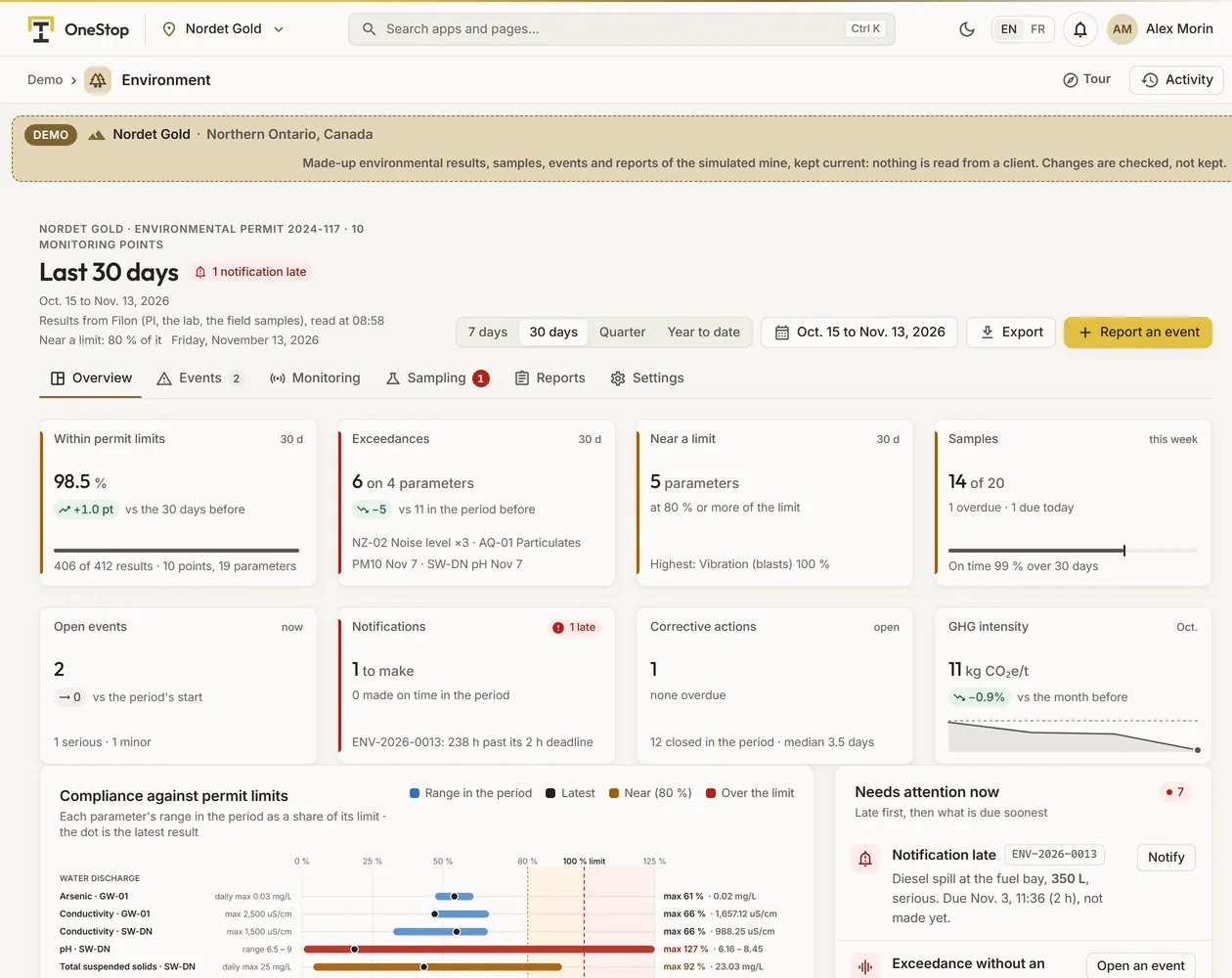
The environment overview of the simulated Nordet Gold mine: its eight tiles, the compliance against permit limits and what needs attention now
Demo section, simulated data.
01 · Overview

The site against its permits, on one page.

Results within permit limits, exceedances, parameters near a limit, the week’s samples, open events, notifications to make, corrective actions and greenhouse gases per tonne. Under them, each parameter’s range against its limit, beside what needs attention now.

  • Late first: a notification late, an exceedance without an event, a sample overdue, a report due.
  • Near a limit means 80 % of it by default, a setting of each site.
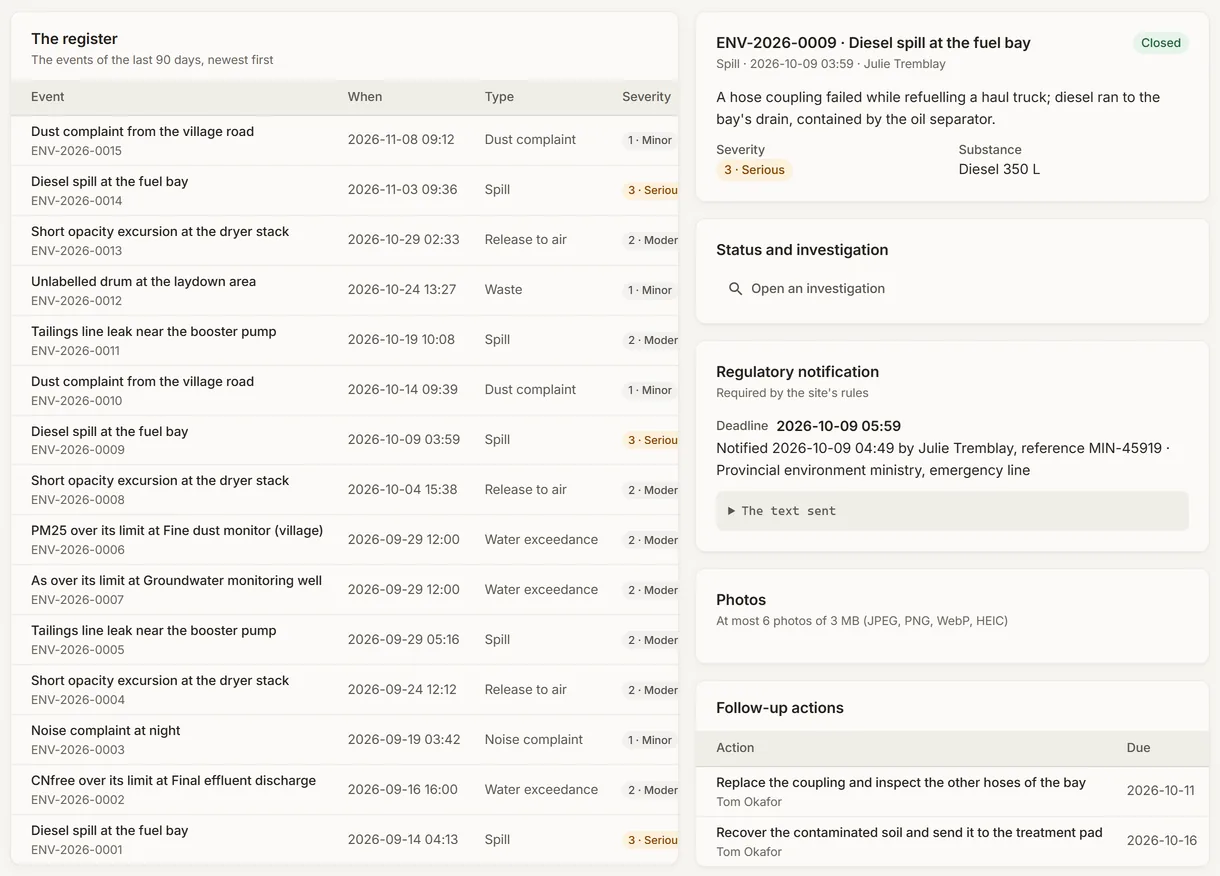
An environmental event of the simulated mine with its notification deadline and its follow-up actions
Demo section, simulated data.
02 · An event

From the report to the regulator’s notice.

Each event with its type, severity, place, substance and quantity, its photos and its follow-up actions. The notification shows its deadline and, once made, when, to whom and its reference.

  • The AI proposes the severity and drafts the notice; a person decides and sends it.
  • A serious event offers Open an investigation, which takes you to Health and Safety.
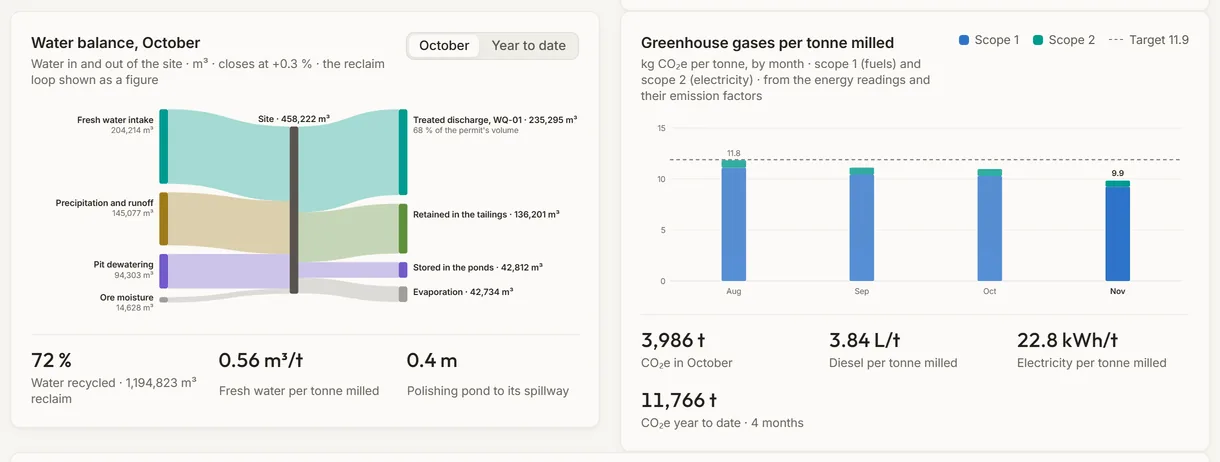
The water balance and the greenhouse gases per tonne milled of the simulated mine
Demo section, simulated data.
03 · Water and greenhouse gases

The water balance and the emissions per tonne, from Filon.

The water in and out of the site for the month or the year, the share recycled and the pond level to its spillway. Beside it, scope 1 and scope 2 emissions per tonne milled, month by month, against your target.

  • Flows read from PI tags where they are mapped, entered by hand otherwise.
  • Diesel and electricity per tonne milled.
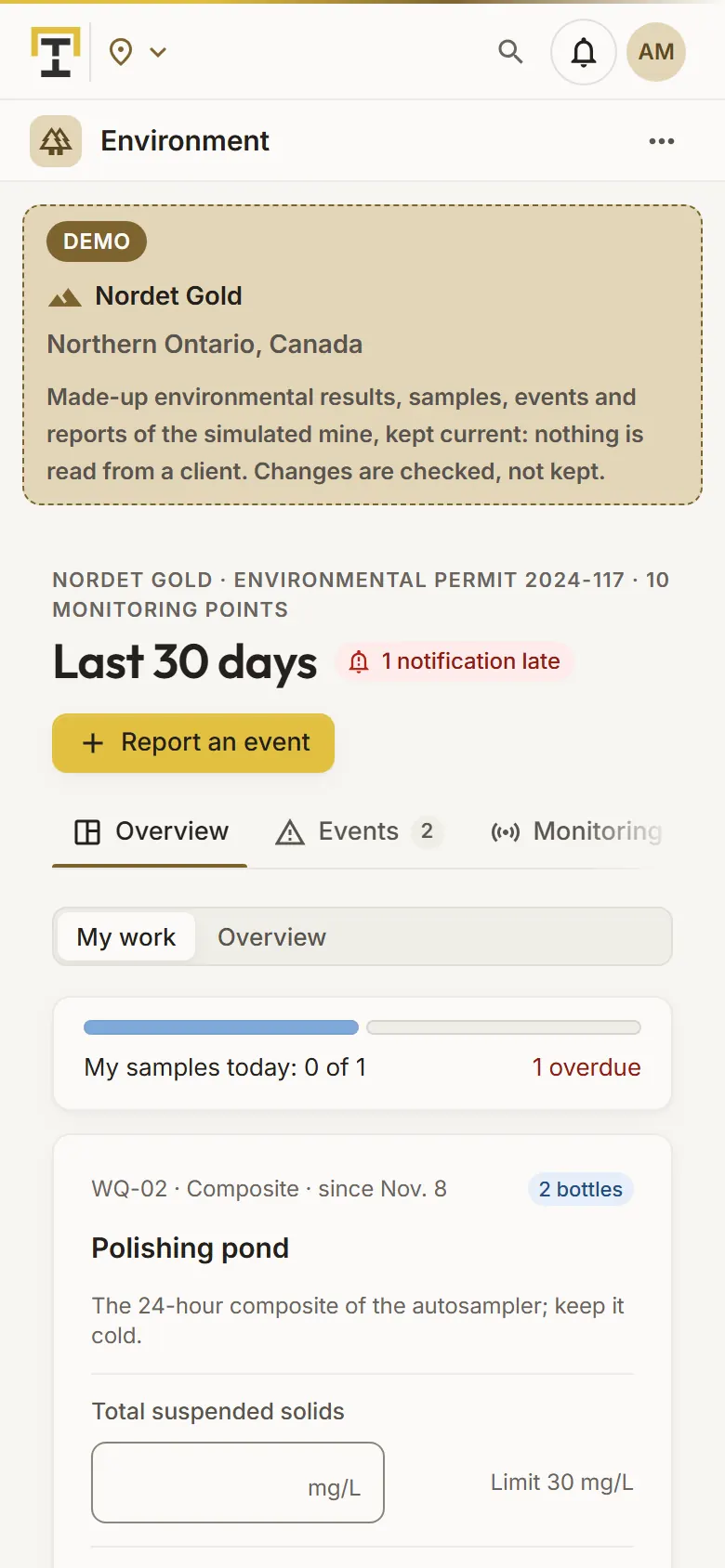
The samples of the day at a simulated mine, on a sampler’s phone
Demo section, simulated data.
04 · In the field

The day’s samples, on a phone.

The sampler’s phone opens on today’s samples: the point, the bottles and the time due, one field per parameter with its limits, and a word as each result is typed: within, near or over.

  • Up to 3 photos and the place, from the phone’s location.
  • Saved into Filon, then the next sample opens.
What it does

Everything it does.

  • Event register

    Ten types of event with their severity, place or map point, substance and quantity, photos and status (open, contained, closed), and the register exported as CSV.

  • Regulatory notifications

    The deadline from your site’s rules by type and severity, the regulator, when it was notified, the reference and the text sent; the late ones first.

  • Corrective actions

    Each action with its owner, due date and state, and the overdue ones on the overview.

  • Monitoring and permit limits

    Filon’s monitoring points against their limits: daily and instantaneous maxima, minimums, ranges such as pH and monthly averages, and the blasts’ airblast and vibration.

  • Sampling and reports

    Sampling plans with their frequency, parameters, bottles and sampler, and the reports your permits ask for, with their due dates and progress.

  • Water and greenhouse gases

    The site’s water balance from PI tags or volumes entered by hand, and scope 1 and 2 emissions per tonne milled.

Standards and integrations

Built on the standards and systems you already use.

Works with

  • AVEVA PI SystemThe water balance’s flows and the pond level read from PI tags, through Filon.
  • Your labThe results of the monitoring points, pushed to Filon through the Data API or imported.
Who uses it

Made for the people who run the site.

  • Environmental advisorsReport and classify events, make the notifications on time and follow the actions.
  • Samplers and techniciansTake the day’s samples on a phone and report what they see in the field.
  • Site and environment managersSee compliance against the permits, the reports due and the actions late.
  • Operations supervisorsReport a spill or a complaint from the field, with its photos.
Questions

What clients ask us.

Does OneStop notify the regulator?

No. It sets the deadline from your site’s rules, can draft the notice with AI, and keeps what you sent. You send it the usual way, then record it.

Where do the monitoring results come from?

From your company’s Filon: results from PI, from the lab, or entered by your samplers, each against the permit limits of its monitoring point.

Who sets the notification rules?

Your administrators, site by site: for a type of event from a given severity, the hours to notify and the regulator. The default rules are placeholders, not legal advice.

Can we try it?

Yes. The Demo section has 60 days of events, a sampling plan, monitoring results and reports due on each of ten simulated mines.

Your data

Your data in this app.

What it reads, what it writes and who sees it. The whole picture: Security and trust.

  • In your own Filon

    Events, samples, actions and photos are kept in your company’s own Filon database.

  • Encrypted with your key

    Descriptions, names, notices and references are encrypted with your company’s own key.

  • Never sent for you

    OneStop never contacts a regulator or sends a report: your people do, then record it.

The OneStop way

Every app follows the same principles.

What is true of this app is true of every app of TTech OneStop: your data, your people and your language come first.

  • Your data stays yours

    The apps read your data through your own AVEVA CONNECT and write back only their own results, in their own streams. Your existing data is never changed.

  • Nothing to install at the site

    OneStop runs in the browser. Your administrator sets up one connection to your AVEVA CONNECT, once, and every app uses it.

  • Your Microsoft sign-in

    Your people sign in with their Microsoft work account. Your own admins decide who uses which app.

  • Explained, never a black box

    Every score, alert and AI answer shows its reason and where its numbers come from, in plain words.

  • English and French

    Every screen, every message and every report, in the language each person chooses.

  • By the piece

    Subscribe to the apps you need and add others later. Try each one first in the demo, on ten simulated mines.

See it on your own data.

Book a demo on our simulated mines, or tell us how you want to use it on yours.