TTech OneStop · Operations

Short-Interval Control

See each hour against its plan while the shift can still recover, and give every hour below target a cause, an action and an owner.

The problem it solves

The shift is lost before anyone sees it.

Production is counted at the end of the shift, or the next morning, when nothing can be recovered.

A slow hour is explained at the meeting, if anyone remembers why, and the same delay comes back the next day.

  • Demo on ten simulated mines
  • English and French
  • Hosted in Canada
  • Your Microsoft sign-in
Hour by hour on a simulated open-pit mine: each crew’s metrics and machines against the shift plan
Demo section, simulated data.
  • Hour by hourEach metric and machine against the shift plan, every hour.
  • Causes and actionsAn hour below target gets a reason, an action, an owner and a due time.
  • EscalationHours below target in a row go to the shift supervisor’s list.
  • ForecastThe end of the shift projected from the pace of the last hours.
What changes

What changes for your team.

  • A gap seen while it can be closed

    BeforeProduction known the next morning.

    With OneStopEach hour against its plan, refreshed every minute, with the end of the shift projected.

  • Every slow hour explained

    BeforeDelays argued over at the morning meeting.

    With OneStopA reason, an action, an owner and a due time for each hour below target.

  • Causes you can rank

    BeforeThe same delays, shift after shift.

    With OneStopThe reasons behind the hours below target, and where the shift’s gap comes from, interruption by interruption.

How it works

From your data to a decision, in a few steps.

  1. Your metrics

    Your administrators choose the metrics of the board: tonnes from truck loads, a PI tag or counts per machine, each with its plan or a rate per hour.

  2. Read from Filon

    Actuals are read from your Filon at each look, never copied: the loads of your fleet system and the values of your PI tags.

  3. Hour by hour

    Each hour is green, amber or red against its target; red hours in a row escalate to the shift supervisor.

  4. Cause and action

    The crew writes the reason, the action, its owner and its due time; the AI can propose them from what happened in that hour.

Inside the app

The screens your teams use.

Each screen below is from the Demo section of OneStop, on a simulated mine. Ask us for a visit to try them yourself.

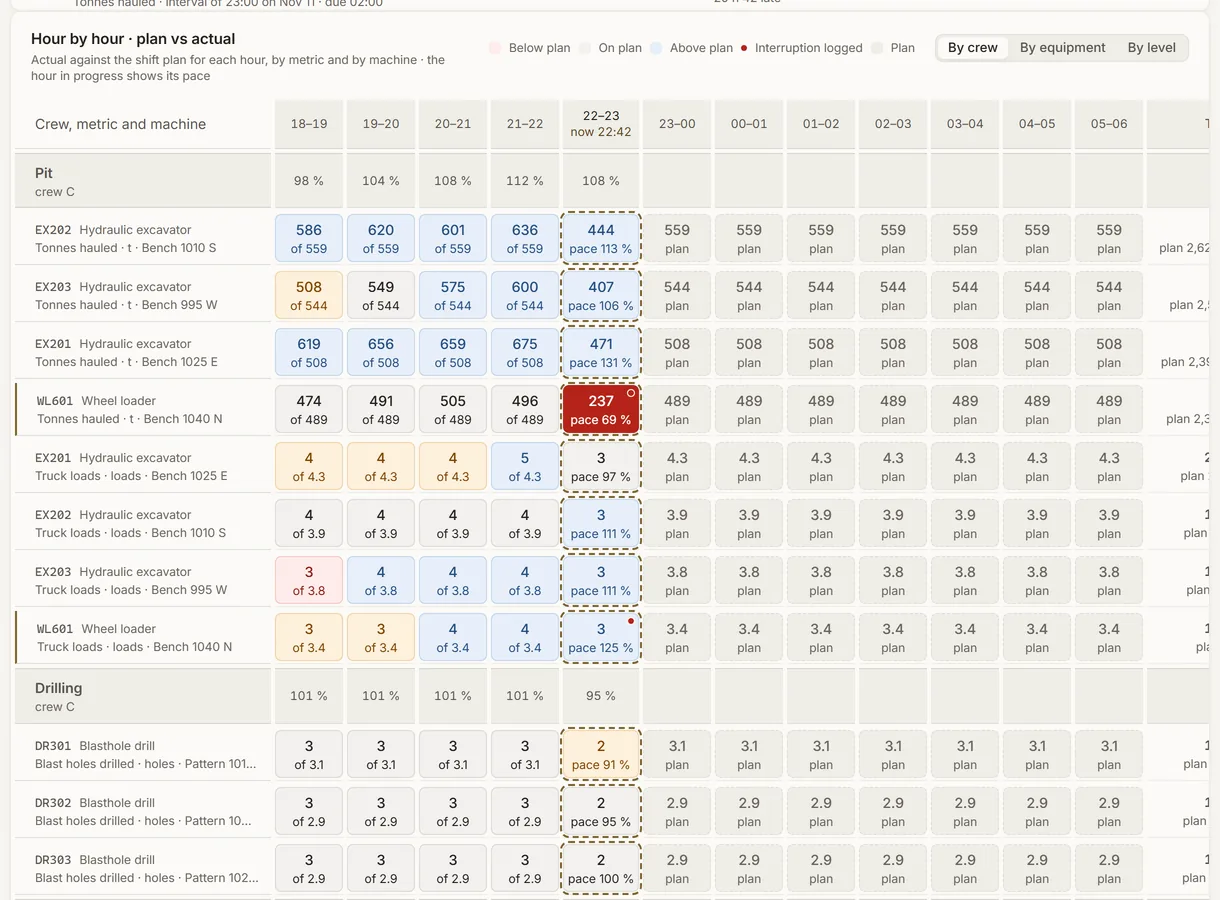
Hour by hour on a simulated open-pit mine: each crew’s metrics and machines against the shift plan
Demo section, simulated data.
01 · Hour by hour

Each metric and each machine against the shift plan, every hour.

Actual against plan for each hour, by crew, by equipment or by level. The hour in progress shows its pace, and a cell is marked when an interruption was logged on that machine.

  • The shift so far and the end of the shift, row by row.
  • Refreshed every minute.
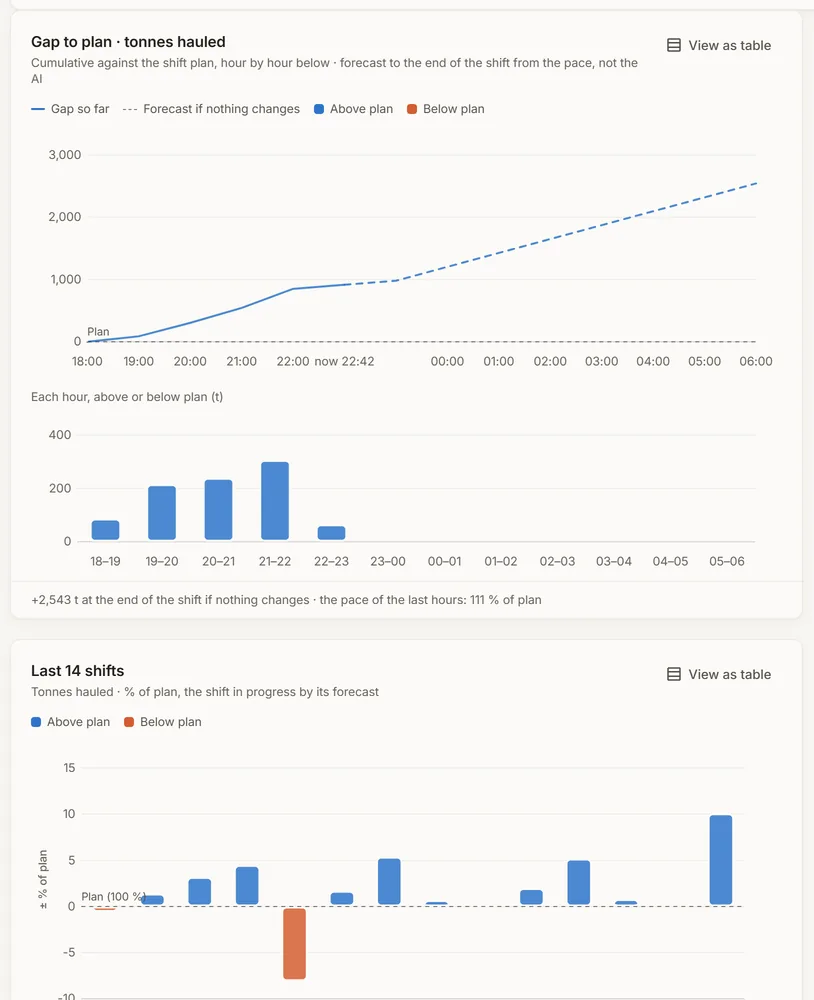
The gap to plan of a simulated mine’s main metric, its forecast to the end of the shift, and the last 14 shifts
Demo section, simulated data.
02 · The gap

How far behind plan, and where the shift will end.

The gap to plan hour by hour, with the end of the shift projected from the pace of the last hours, and each of the last 14 shifts against its plan.

  • A projection from the figures, not the AI.
  • Each hour above or below plan, as a bar.
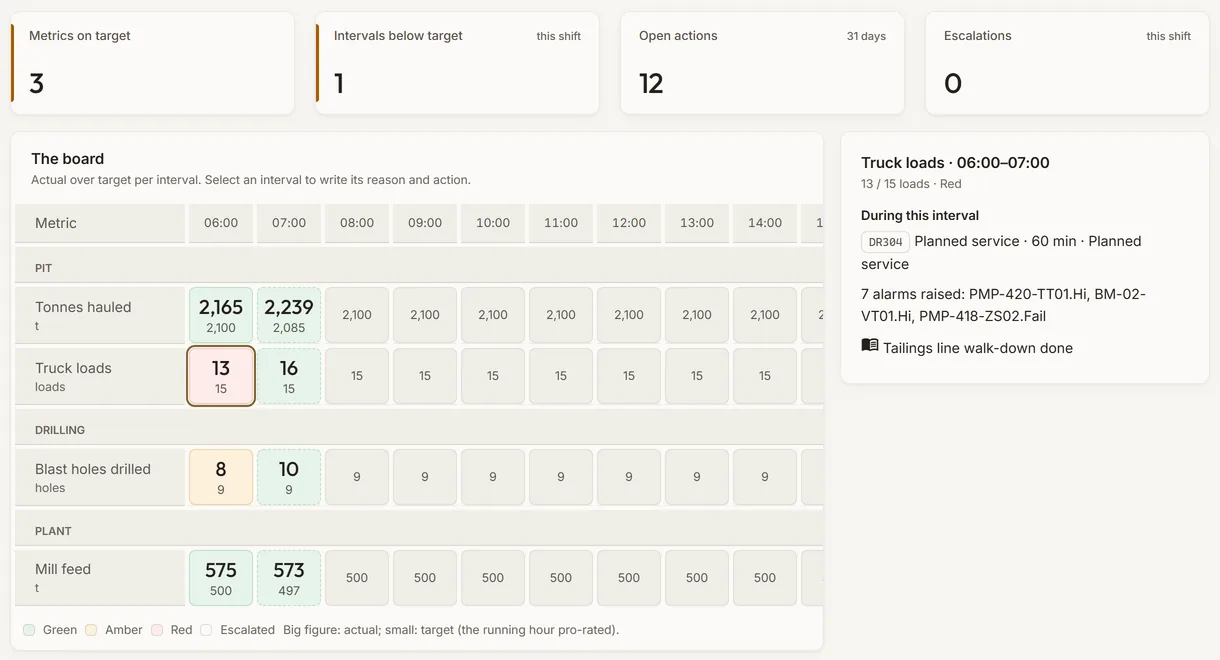
The board of a simulated mine with an hour below target opened: what was down, the alarms, the logbook entries and its deviation
Demo section, simulated data.
03 · The board

An hour below target, and what happened in it.

Select an hour on the board: the equipment down during it, the alarms raised and the logbook entries of that hour, then its reason, its action, its owner and its due time.

  • On your own board, Propose with AI drafts the reason and the action, for a person to accept or change.
  • A wall mode for the control room screen.
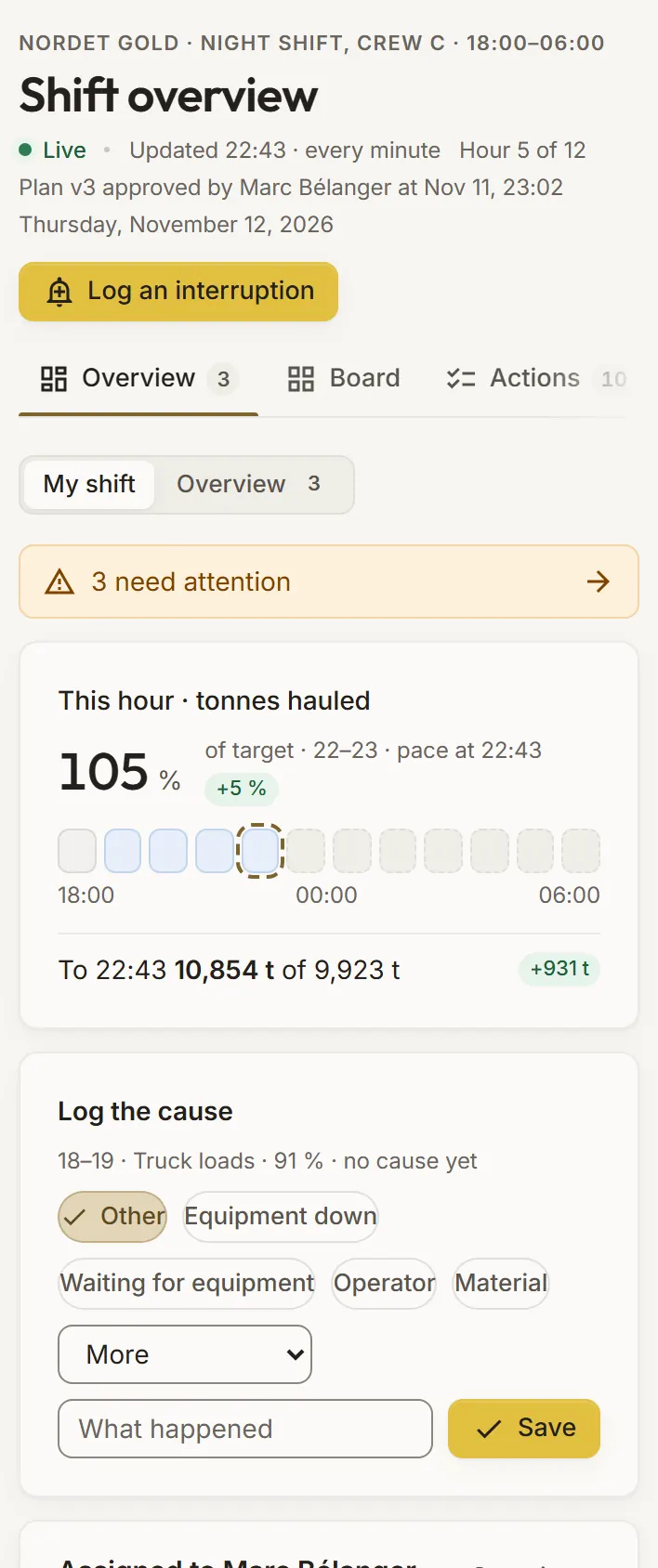
My shift in Short-Interval Control on a phone, on a simulated mine
Demo section, simulated data.
04 · On a phone

This hour, and the cause to log, in the supervisor’s pocket.

My shift opens first: this hour against its target, the strip of the shift’s hours, the latest hour below target with no cause yet, and the actions assigned to you.

  • The cause suggested from the interruption that overlapped the hour.
  • Tick an action done.
What it does

Everything it does.

  • Your metrics, your plan

    Tonnes from truck loads, a PI tag’s hourly value or counts per machine; the target from the plan in Filon or a rate per hour, with plan versions your administrators approve.

  • The hour-by-hour grid

    Each metric and machine against plan, by crew, equipment or level, with the shift so far and the end of the shift; the board has a wall mode for the control room.

  • Deviations and actions

    For each hour below target: a reason from a fixed list, what happened, an action, its owner and its due time; the AI can propose them from what happened in that hour.

  • Escalation

    Hours below target in a row escalate to the shift supervisor’s list, and show in what needs attention now.

  • Interruptions

    What stopped or slowed a machine, logged with its category, its reason and what it cost, and where the shift’s gap comes from.

  • Trends and causes

    Each metric’s shifts of the last 14 days against target, and how many hours below target each reason explains, for any period.

Standards and integrations

Built on the standards and systems you already use.

Works with

  • FilonTruck loads, PI tag values, plans, shifts, crews and equipment, read at each look.
  • Fleet management systemThe truck loads it sends to Filon give the tonnes of each shovel or loader, hour by hour.
  • AVEVA PI SystemA PI tag in Filon gives a rate, a total or a level to hold, hour by hour.
  • Operator LogbookThe handover draft opens the logbook’s handover; the logbook entries of an hour help explain it.
Who uses it

Made for the people who run the site.

  • Control room operatorsSee every hour against its plan on the wall, and log the cause while it is fresh.
  • Shift supervisorsAct on escalations, assign actions, and know where the shift will end.
  • Mine and plant superintendentsRank the causes that cost the most, shift after shift.
  • PlannersCompare each shift with its plan, and see which machines fall behind.
Questions

What clients ask us.

Where do the actuals come from?

From your Filon, read at each look and never copied: the truck loads your fleet system sends, your PI tag values, or counts entered per hour and machine.

Where do the targets come from?

From the plan in your Filon, spread hour by hour, or from a rate per hour you set. Your administrators approve each version of the plan.

Does the AI decide the cause?

No. It proposes a reason and an action from the equipment down, the alarms and the logbook entries of that hour; a person accepts or changes them. The end-of-shift forecast is a projection from the figures, not the AI.

Can we try it?

Yes. The Demo section has 14 days of shifts on each simulated mine, kept current. What you write there is checked, not kept.

Your data

Your data in this app.

What it reads, what it writes and who sees it. The whole picture: Security and trust.

  • Read, never copied

    Actuals are read from your Filon at each look; nothing is copied elsewhere.

  • Encrypted with your key

    Comments, actions and their owners are encrypted with your company’s own key.

  • Every plan kept

    Each plan version keeps who approved it and when; older versions stay.

The OneStop way

Every app follows the same principles.

What is true of this app is true of every app of TTech OneStop: your data, your people and your language come first.

  • Your data stays yours

    The apps read your data through your own AVEVA CONNECT and write back only their own results, in their own streams. Your existing data is never changed.

  • Nothing to install at the site

    OneStop runs in the browser. Your administrator sets up one connection to your AVEVA CONNECT, once, and every app uses it.

  • Your Microsoft sign-in

    Your people sign in with their Microsoft work account. Your own admins decide who uses which app.

  • Explained, never a black box

    Every score, alert and AI answer shows its reason and where its numbers come from, in plain words.

  • English and French

    Every screen, every message and every report, in the language each person chooses.

  • By the piece

    Subscribe to the apps you need and add others later. Try each one first in the demo, on ten simulated mines.

See it on your own data.

Book a demo on our simulated mines, or tell us how you want to use it on yours.