TTech OneStop · Operations

Production Accounting

Close each production day on figures everyone agrees on: balanced, reconciled, adjusted with a reason and signed.

The problem it solves

The month closes on numbers nobody can explain.

Weighings, samples and assays never agree exactly: the feed does not equal the product plus the tailings, and the gap is found at month-end.

Corrections are made in a spreadsheet, without a reason or a trace, and the figures change after they were reported.

  • Demo on ten simulated mines
  • English and French
  • Hosted in Canada
  • Your Microsoft sign-in
The production accounting of a simulated plant: ore milled, head grade, recovery and metal against plan, and what needs attention
Demo section, simulated data.
  • BalancedFeed, product and tailings, in tonnes and in metal, every production day.
  • CheckedThe measured recovery against the recovery from the grades alone.
  • ApprovedEach adjustment has a reason and is approved by an administrator other than its author.
  • SignedA signed day keeps its figures; reopening it takes an administrator and a reason.
What changes

What changes for your team.

  • Days closed on time

    BeforeThe balance done at month-end, in spreadsheets.

    With OneStopEach production day balanced, reconciled and signed, with the late days shown.

  • Corrections you can defend

    BeforeFigures changed in a spreadsheet, without a trace.

    With OneStopEvery adjustment kept with its reason, its author and its approver.

  • The month against the plan

    BeforeActuals compared with the budget once a month.

    With OneStopOre milled, head grade, recovery and metal against the plan, day by day.

How it works

From your data to a decision, in a few steps.

  1. From Filon

    The tonnes and grades of the feed, the product and the tailings are read from your Filon, per shift or per day.

  2. Measured against calculated

    The recovery from the grades alone sits beside the measured one, and the metal not accounted for is shown.

  3. Reconciled

    The tonnes, then the metal, are reconciled so that both balances close: a less certain measurement moves more.

  4. Adjusted and signed

    A person adjusts a figure with a reason, an administrator approves it, then the day is signed with its comment.

Inside the app

The screens your teams use.

Each screen below is from the Demo section of OneStop, on a simulated mine. Ask us for a visit to try them yourself.

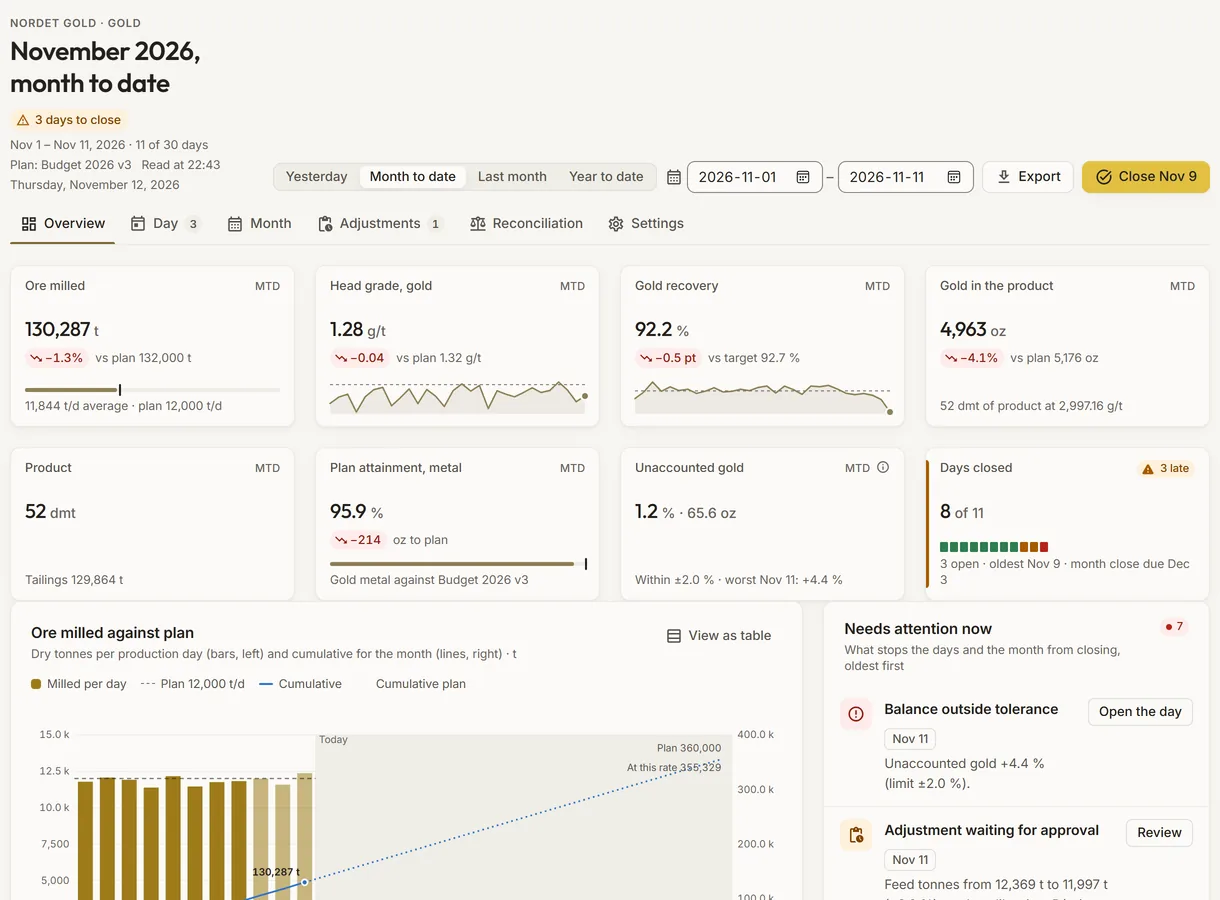
The production accounting overview of a simulated plant, against its plan
Demo section, simulated data.
01 · Overview

The period at a glance, against the plan.

Ore milled, head grade, recovery, metal in the product, plan attainment, unaccounted metal and days closed, with the ore milled per day against the plan and what needs attention now.

  • Yesterday, month to date, last month, year to date or a range of dates.
  • What stops a day from closing, oldest first, each with its action.
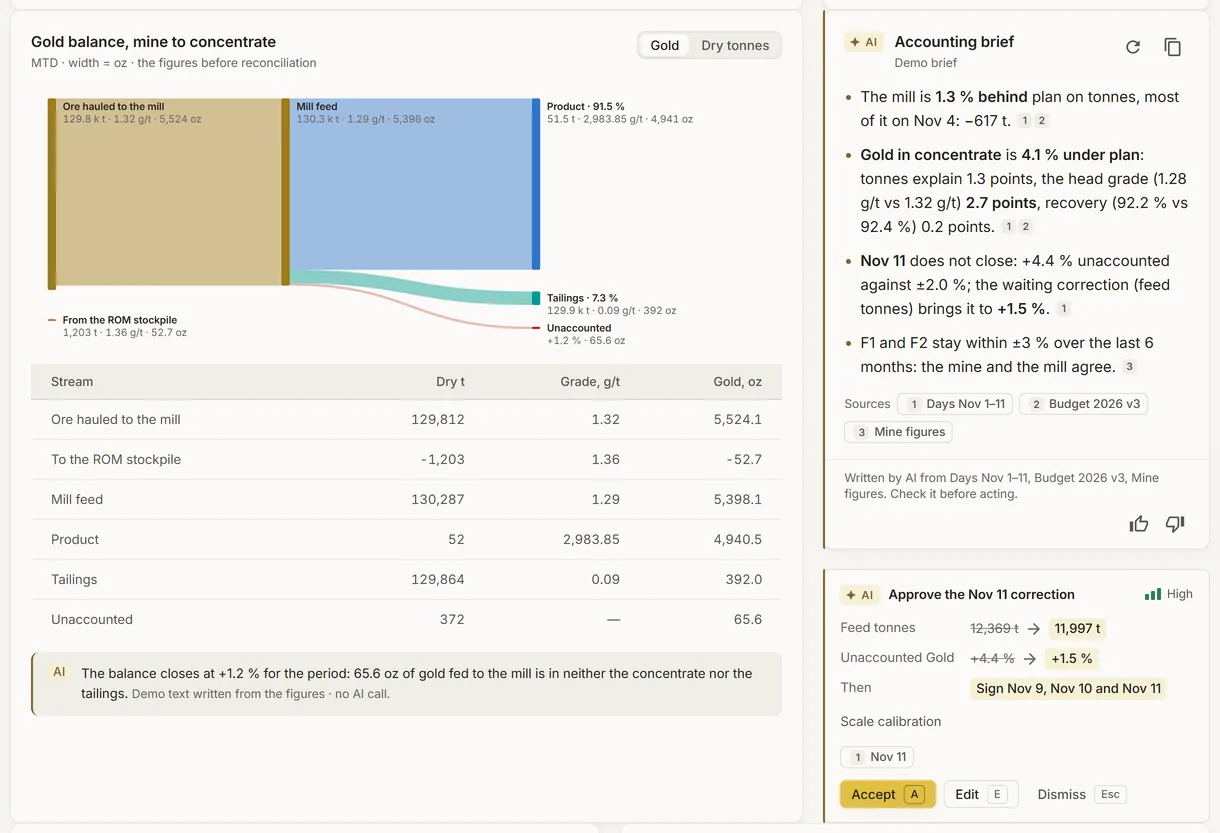
The metal balance of a simulated mine, from the ore hauled to the product, beside the accounting brief
Demo section, simulated data.
02 · Mine to concentrate

Where the metal goes, from the mine to the concentrate.

The ore hauled to the mill, the run-of-mine stockpile, the mill feed, the product, the tailings and what is not accounted for, in metal or in dry tonnes.

  • The accounting brief beside it, with its sources.
  • Its suggestion: approve the oldest waiting adjustment, with the day’s unaccounted metal before and after.
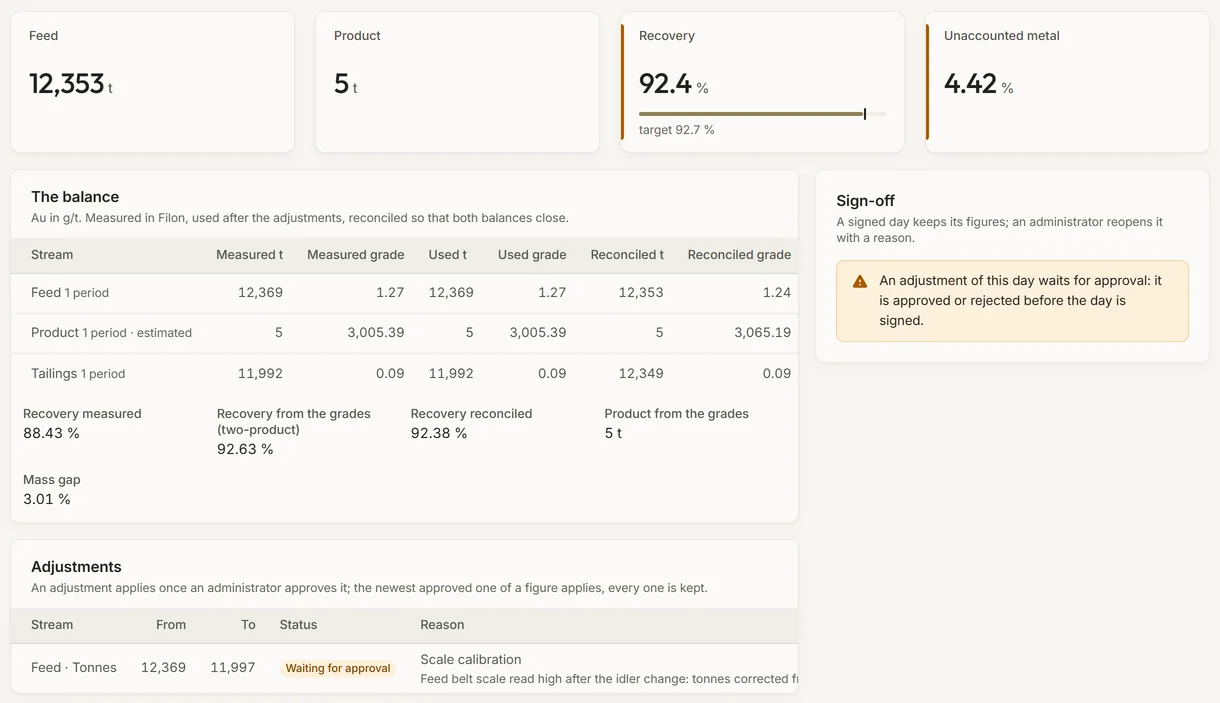
A production day of a simulated plant: the balance of its streams, its adjustments and its sign-off
Demo section, simulated data.
03 · The day

One production day, balanced and signed.

Each stream measured, used after the approved adjustments and reconciled, with the recovery measured, from the grades and reconciled, and the mass gap.

  • An adjustment waits for an administrator’s approval before it applies.
  • A signed day keeps its figures; an administrator reopens it with a reason.
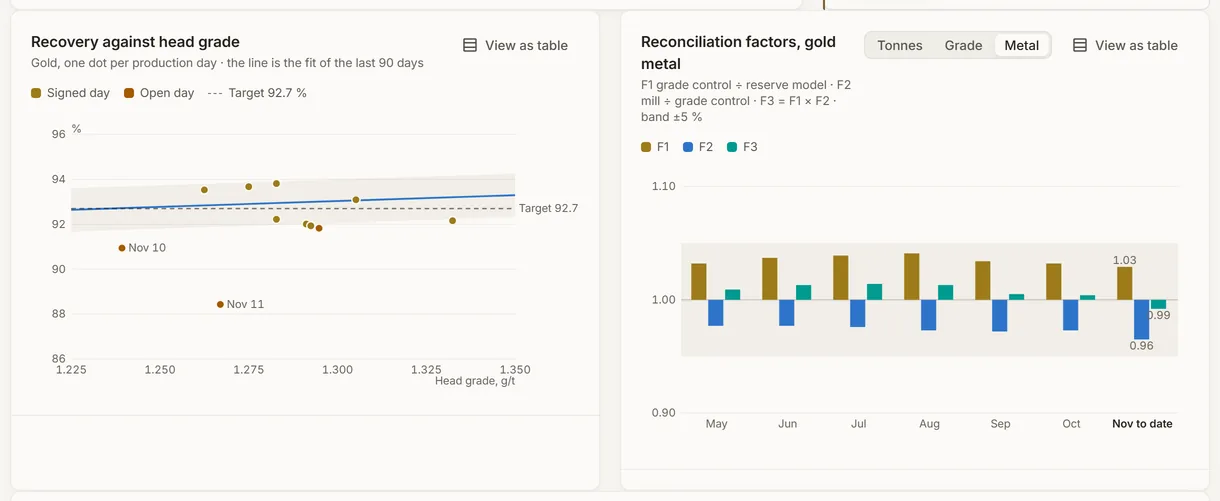
The recovery against head grade and the reconciliation factors of a simulated mine
Demo section, simulated data.
04 · Reconciliation

Recovery against head grade, and the mine’s model checked.

Each day’s recovery against its head grade and the line of recent days, beside the F1, F2 and F3 factors of the last six months and the month in progress: grade control against the reserve model, the mill against grade control, and the whole chain.

  • A day far under its line is named.
  • The factors on tonnes, grade or metal, against their usual band.
What it does

Everything it does.

  • Daily production report

    Feed, product and tailings in tonnes, grade and metal for every production day, and a second element where the plant has one, such as gold beside copper.

  • Mass and metal balance

    Measured against calculated with the two-product formula, the mass gap and the metal not accounted for, then reconciled so that both balances close.

  • Adjustments with approval

    Tonnes or a grade adjusted with a reason from a list, approved by an administrator other than its author; every one is kept.

  • Sign-off by day and month

    A signed day keeps its figures; a month is signed once its days are, and reopening needs an administrator and a reason.

  • Plan and reconciliation factors

    The plan by month, in versions, with ore milled, head grade, recovery and metal against it, and the F1, F2 and F3 factors from the mine figures.

  • A brief and exports

    An accounting brief of the period, a comment of the day drafted by the AI on request, and CSV exports of a day, a month or any period.

Standards and integrations

Built on the standards and systems you already use.

Works with

  • FilonThe plant’s streams, their tonnes per period and their grades, read where they are, never copied.
  • Your plant and lab systemsWhatever pushes the streams’ tonnes and grades to Filon, as JSON or CSV.
Who uses it

Made for the people who run the site.

  • MetallurgistsBalance, adjust and sign each production day, with a reason for every change.
  • Plant and mill managersFollow the ore milled, the recovery and the metal against the plan.
  • Mine geologists and plannersSee how grade control and the reserve model compare with what the mill received.
  • Finance and site managementRely on signed figures that no longer change after they are reported.
Questions

What clients ask us.

Where do the figures come from?

From your Filon: the tonnes and grades of the feed, the product and the tailings of each shift or day, as your systems push them. The app never changes them; adjustments are kept apart.

Who can change a figure?

A person of your company proposes an adjustment with a reason, and an administrator other than its author approves it. Only an administrator reopens a signed day, with a reason.

Does it work on a phone?

Yes. A phone opens on the manager’s summary: yesterday’s close, the main figures against the plan and what needs attention.

Can we try it?

Yes. The Demo section has a balance for each simulated mine, with six months of production days, a plan and adjustments.

Your data

Your data in this app.

What it reads, what it writes and who sees it. The whole picture: Security and trust.

  • Your figures stay as measured

    The app reads the streams’ figures in Filon and never changes them; each adjustment is its own record.

  • Names and comments encrypted

    Who adjusted, approved and signed, and every comment, are encrypted with your company’s own key.

  • A record that holds

    Every adjustment, signature and reopening is kept, and each export is recorded in the audit trail.

The OneStop way

Every app follows the same principles.

What is true of this app is true of every app of TTech OneStop: your data, your people and your language come first.

  • Your data stays yours

    The apps read your data through your own AVEVA CONNECT and write back only their own results, in their own streams. Your existing data is never changed.

  • Nothing to install at the site

    OneStop runs in the browser. Your administrator sets up one connection to your AVEVA CONNECT, once, and every app uses it.

  • Your Microsoft sign-in

    Your people sign in with their Microsoft work account. Your own admins decide who uses which app.

  • Explained, never a black box

    Every score, alert and AI answer shows its reason and where its numbers come from, in plain words.

  • English and French

    Every screen, every message and every report, in the language each person chooses.

  • By the piece

    Subscribe to the apps you need and add others later. Try each one first in the demo, on ten simulated mines.

See it on your own data.

Book a demo on our simulated mines, or tell us how you want to use it on yours.