TTech OneStop · Shift and field

Lab Results

See every result against its specification, beside what the process was doing, and know whether the lab’s QA/QC can be trusted.

The problem it solves

Lab results arrive, and nobody sees the one out of spec.

Assays come back in a LIMS, a spreadsheet or an email, far from the process data, and a result out of specification waits until someone looks.

Without the standards, blanks and duplicates checked, nobody knows whether a strange result is the plant or the lab.

  • Demo on ten simulated mines
  • English and French
  • Hosted in Canada
  • Your Microsoft sign-in
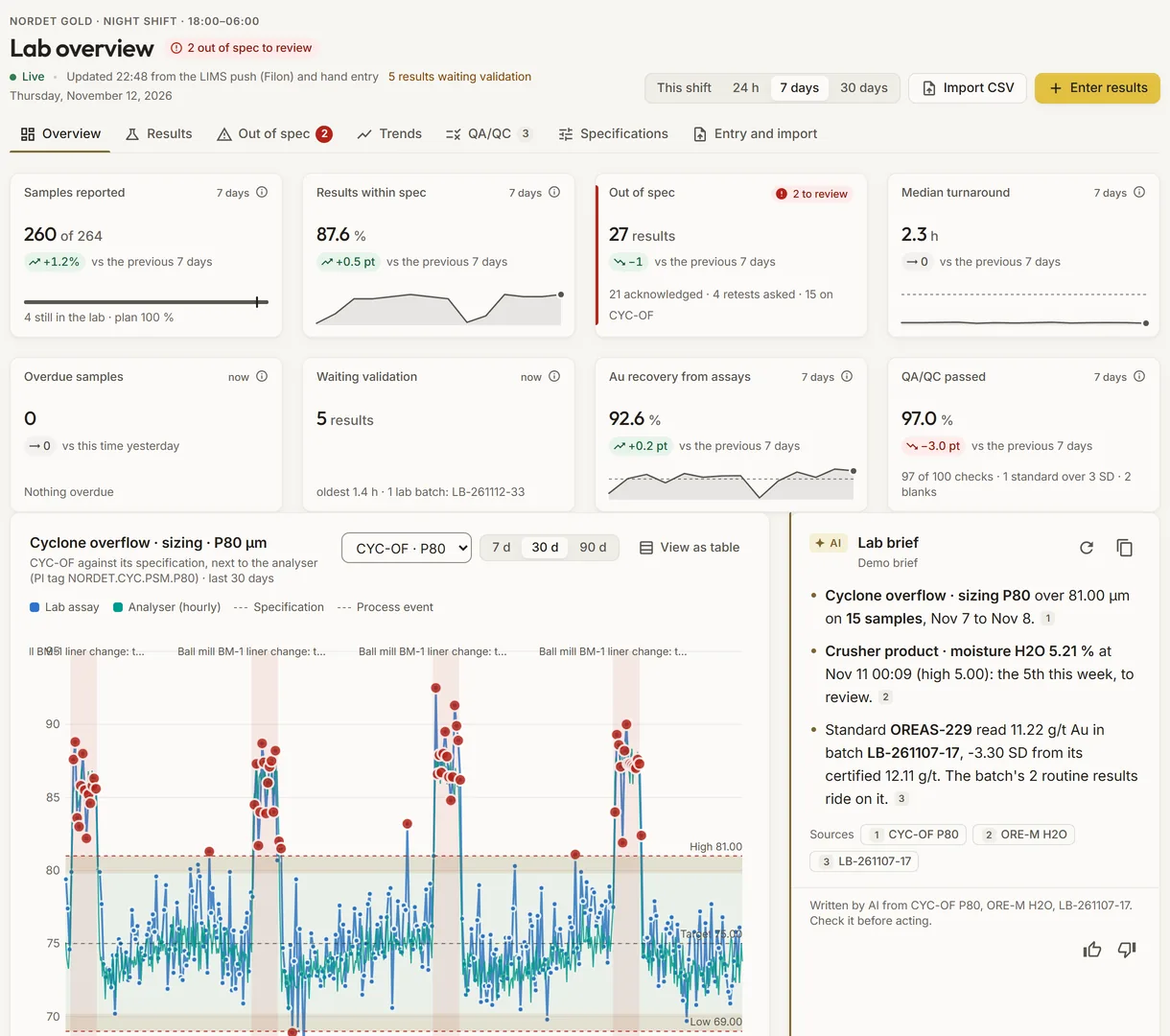
The lab overview of a simulated plant: samples reported, results within spec, turnaround and QA/QC, and a point’s results against its specification beside the analyser
Demo section, simulated data.
  • SpecificationsLow, target and high limits per sampling point and element, with a warning band.
  • Out of specEvery result out of spec listed until someone reviews it.
  • Beside the processAn element’s trend next to the analyser’s PI tag.
  • QA/QCStandards, blanks and duplicates checked against their limits.
What changes

What changes for your team.

  • Out-of-spec results seen

    BeforeA bad result noticed hours later, by chance.

    With OneStopEach result out of spec listed, with its review: acknowledged, retest asked or accepted.

  • Lab and process together

    BeforeAssays in one system, process data in another.

    With OneStopAn element at a point on the same chart as the analyser, with the lab’s bias against it.

  • Results you can trust

    BeforeQA/QC checked now and then, by hand.

    With OneStopStandards, blanks and duplicates checked for every period, and the batch to re-assay named.

How it works

From your data to a decision, in a few steps.

  1. From your LIMS, through Filon

    Your LIMS pushes its samples and results to Filon; the app reads them as they are.

  2. Or entered here

    Where no LIMS pushes, a sample is entered by hand or a CSV is checked, then sent to Filon with the same checks as a LIMS push.

  3. Against the specification

    Each final result is compared with the specification in force on its collection day.

  4. Reviewed and checked

    Results out of spec are reviewed, QA/QC is checked, and preliminary results are validated by batch.

Inside the app

The screens your teams use.

Each screen below is from the Demo section of OneStop, on a simulated mine. Ask us for a visit to try them yourself.

The lab overview of a simulated plant, with a point’s results against its specification beside the analyser
Demo section, simulated data.
01 · Overview

The lab’s period at a glance.

Samples reported, results within spec, out of spec, median turnaround, overdue samples, results waiting validation, recovery from assays and QA/QC passed, then a point’s results against its specification beside the analyser.

  • This shift, 24 hours, 7 days or 30 days, each against the window before.
  • A lab brief with its sources and one suggestion.
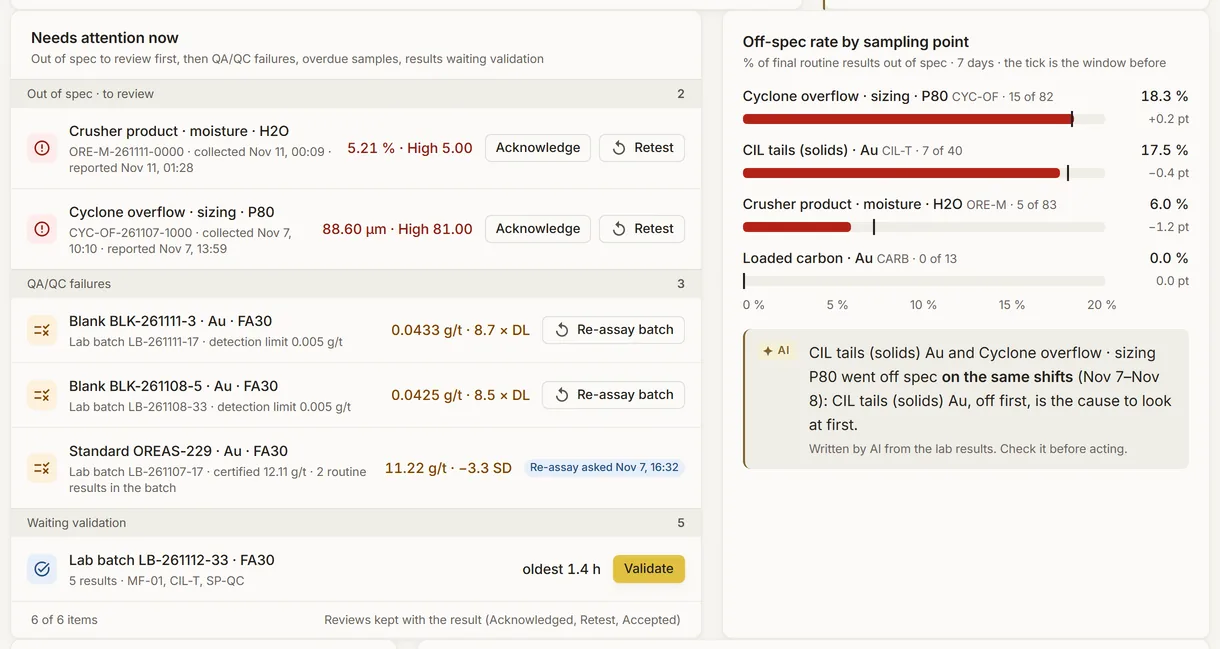
What needs attention in the lab of a simulated plant, with the off-spec rate by sampling point
Demo section, simulated data.
02 · Needs attention

What to act on first.

Results out of spec to review, failed QA/QC checks, overdue samples by point and lab batches waiting validation, each with its action.

  • Acknowledge, ask a retest, re-assay a batch or validate it, in place.
  • The off-spec rate of each sampling point beside it, against the window before.
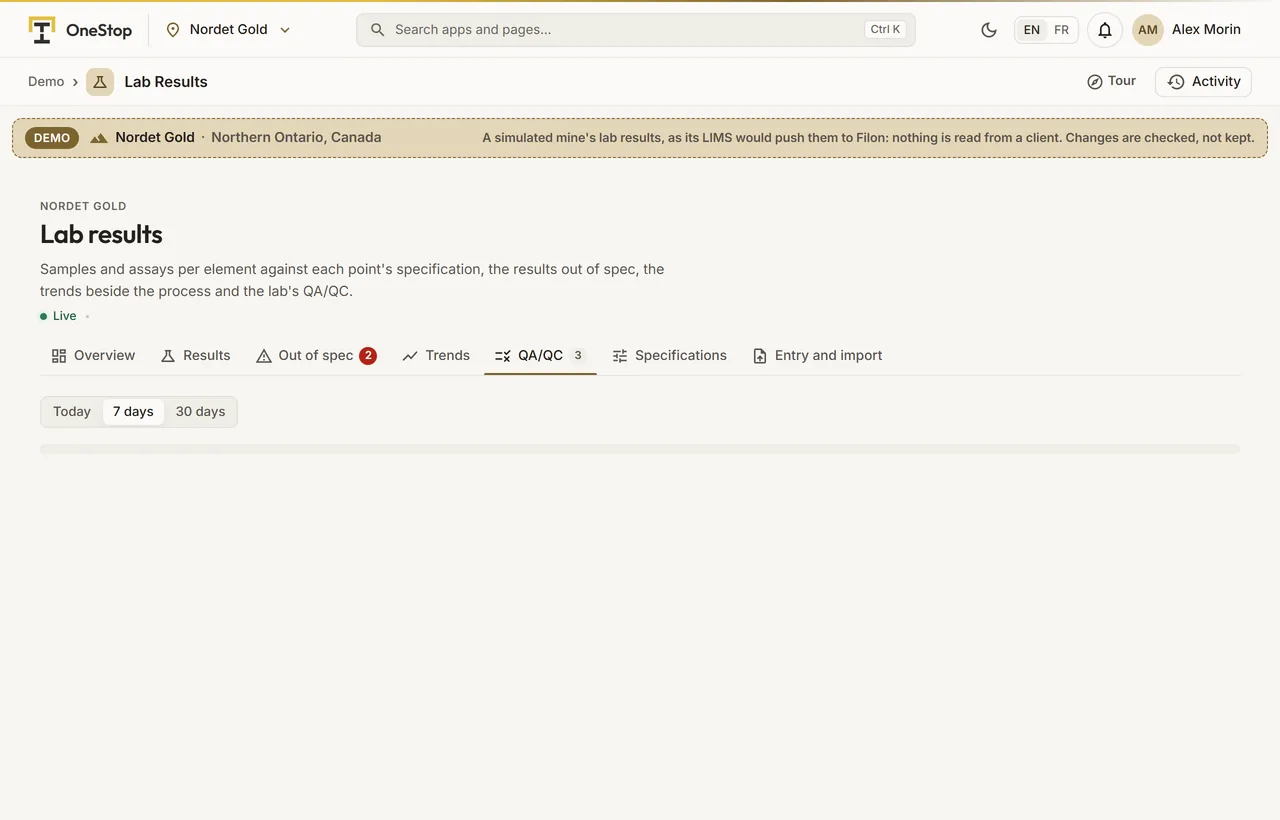
The QA/QC checks of the simulated lab: standards, blanks and duplicates
Demo section, simulated data.
03 · QA/QC

Standards, blanks and duplicates, checked.

Each standard against its certified value, each blank against the detection limit, each duplicate against its original, with the failures counted.

  • Today, 7 days or 30 days.
  • Only final results are judged.
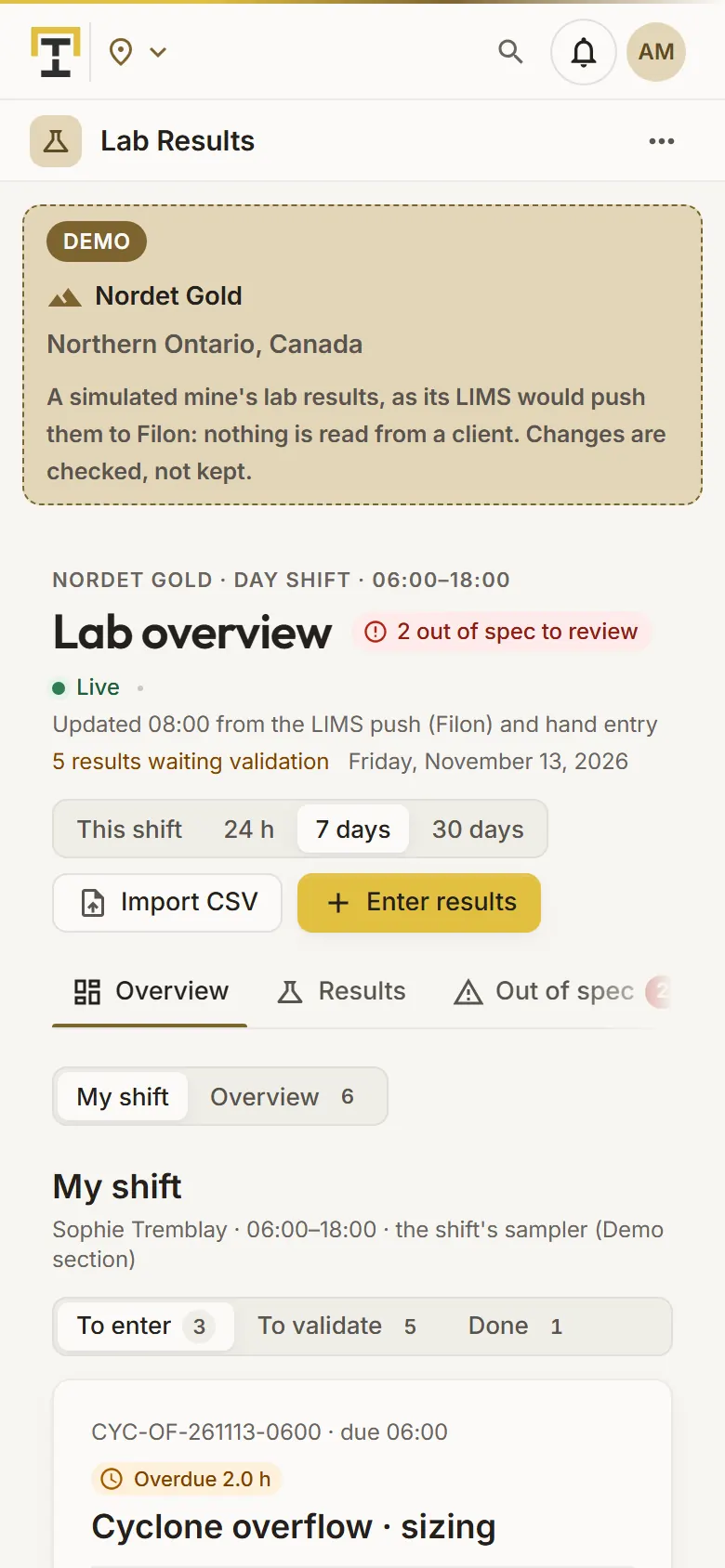
The samples to enter of a shift of the simulated lab, on a phone
Demo section, simulated data.
04 · On the shift

Enter the shift’s samples from a phone.

The samples the shift enters itself, such as sizing and moisture: big inputs with the specification and the last value beside them, the state shown as it is typed, then save and next.

  • The lab batches to validate, and what is done.
  • Out of spec, overdue and turnaround, one tap away.
What it does

Everything it does.

  • Samples and results

    The latest samples of a site with each element’s value and its state against the specification; a sample opens its analyses and results.

  • Specifications

    Low, target and high limits per sampling point and element, dated, with a warning band inside them.

  • Out-of-spec review

    Each result out of spec or in the warning band, reviewed as acknowledged, retest asked or accepted, with a note.

  • Trends beside the process

    An element at a point over 7, 30 or 90 days, its limits, the PI tag beside it and the process events, with mean, standard deviation, Cpk and the lab’s bias.

  • QA/QC and turnaround

    Standards, blanks and duplicates checked; the time from collection to the final result, and the samples overdue.

  • Entry, import and validation

    A sample by hand, a CSV checked before it is imported, and preliminary results validated by batch, all through Filon.

Standards and integrations

Built on the standards and systems you already use.

Works with

  • Your LIMSIt keeps pushing its samples and results to Filon; the app reads them as they are.
  • FilonIts laboratory tables, and the process values of your PI tags.
Who uses it

Made for the people who run the site.

  • MetallurgistsSee which results are out of spec and what the process was doing.
  • Lab supervisors and chemistsFollow turnaround and QA/QC, and validate batches.
  • Operators and samplersEnter the shift’s samples from a phone.
  • Process engineersCompare the lab with the online analysers.
Questions

What clients ask us.

Do we need a LIMS?

No. Where no LIMS pushes to Filon, people enter a sample by hand or import a CSV. Where one does, it keeps pushing and the app reads its results.

Does it replace our LIMS?

No. Instrument interfaces, chain of custody and the lab’s worksheets stay in your LIMS; the app shows its results against your specifications.

Can an import go wrong halfway?

No. An import is all or nothing: a refused row, with its line and its reason, keeps nothing, and the file can be checked first without keeping anything.

Can we try it?

Yes. The Demo section has the lab of each simulated mine’s plant, from copper flotation to a coal preparation plant, kept current.

Your data

Your data in this app.

What it reads, what it writes and who sees it. The whole picture: Security and trust.

  • Your LIMS’s values kept

    Entry and import never change a sample your LIMS pushed; validating a batch only makes its preliminary results final.

  • All or nothing

    Entries and imports go through Filon’s own checks in one transaction; a refused row keeps nothing.

  • Names and notes encrypted

    Who reviewed or validated, and every note, are encrypted with your company’s own key.

The OneStop way

Every app follows the same principles.

What is true of this app is true of every app of TTech OneStop: your data, your people and your language come first.

  • Your data stays yours

    The apps read your data through your own AVEVA CONNECT and write back only their own results, in their own streams. Your existing data is never changed.

  • Nothing to install at the site

    OneStop runs in the browser. Your administrator sets up one connection to your AVEVA CONNECT, once, and every app uses it.

  • Your Microsoft sign-in

    Your people sign in with their Microsoft work account. Your own admins decide who uses which app.

  • Explained, never a black box

    Every score, alert and AI answer shows its reason and where its numbers come from, in plain words.

  • English and French

    Every screen, every message and every report, in the language each person chooses.

  • By the piece

    Subscribe to the apps you need and add others later. Try each one first in the demo, on ten simulated mines.

See it on your own data.

Book a demo on our simulated mines, or tell us how you want to use it on yours.