TTech OneStop · Shift and field

Operator Rounds

Know which rounds were done, late or missed, and give every reading out of its limits a follow-up, shift after shift.

The problem it solves

Rounds on paper are walked, then forgotten.

Readings are written on a sheet or typed into a spreadsheet at the end of the shift, and a value out of its limits waits for someone to notice.

Nobody can say which rounds were missed last week, or whether a bearing has been running a little hotter every day.

  • Demo on ten simulated mines
  • English and French
  • Hosted in Canada
  • Your Microsoft sign-in
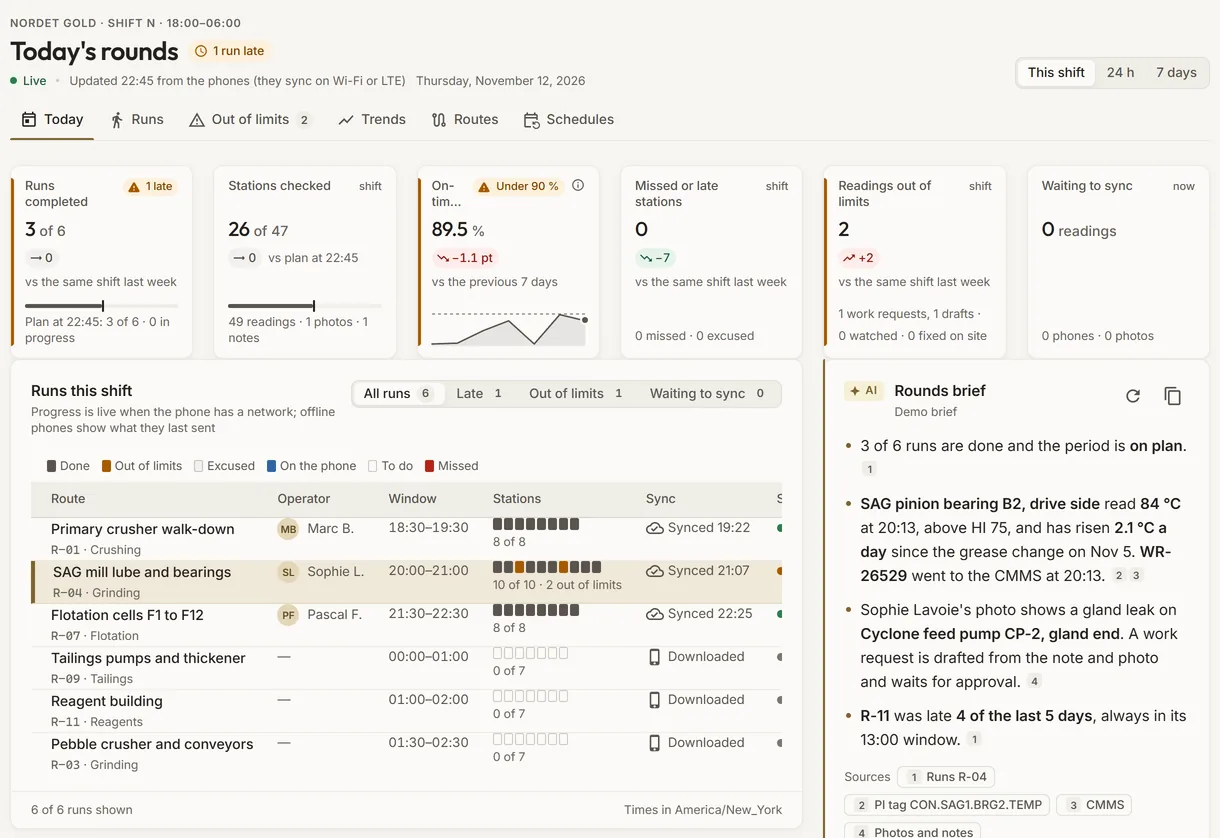
Today’s rounds of a simulated concentrator: runs completed against the plan, stations checked, readings out of limits and each run’s stations
Demo section, simulated data.
  • Against limitsEach reading checked against its low and high limits as it is typed.
  • Follow-upsA reading out of limits opens a follow-up, with its priority and due time.
  • Beside PIA checkpoint can name a PI tag of your Filon: the tag’s value beside the reading.
  • ComplianceEach round done, late or missed, by route and by shift.
What changes

What changes for your team.

  • Rounds you can count

    BeforePaper sheets filed at the end of the shift.

    With OneStopEach round done, late or missed against its schedule, route by route.

  • No reading left alone

    BeforeA value out of limits noticed days later, if at all.

    With OneStopA follow-up opened as the round is sent, with its priority and due time.

  • Field and process side by side

    BeforeA hand-held reading and the PI value kept in two places.

    With OneStopThe readings of a checkpoint and its PI tag on the same trend, with the limits.

How it works

From your data to a decision, in a few steps.

  1. Routes per area

    Your administrators set the routes: checkpoints in the order of the walk, each a reading, a check, a choice or a text, with its limits and instructions.

  2. Scheduled on your shifts

    Each route runs every shift, daily or weekly, on your site’s shifts in Filon, with a window to do it in.

  3. Filled in the browser

    The operator opens the round on a laptop, a tablet or a phone, enters each value, adds a note or a photo, and sends it.

  4. Followed up

    A reading out of limits opens a follow-up; supervisors see the compliance, the readings out of limits and the trends.

Inside the app

The screens your teams use.

Each screen below is from the Demo section of OneStop, on a simulated mine. Ask us for a visit to try them yourself.

Today’s rounds of a simulated concentrator: the figures of the shift and each run with its stations
Demo section, simulated data.
01 · Today

Every round of the shift, and where it stands.

Runs completed against the plan, stations checked, stations on time over 7 days, stations missed or late, and readings out of limits, each with its change.

  • Each run’s stations as a bar: done, out of limits, to do or missed.
  • This shift, the last 24 hours or the last 7 days.
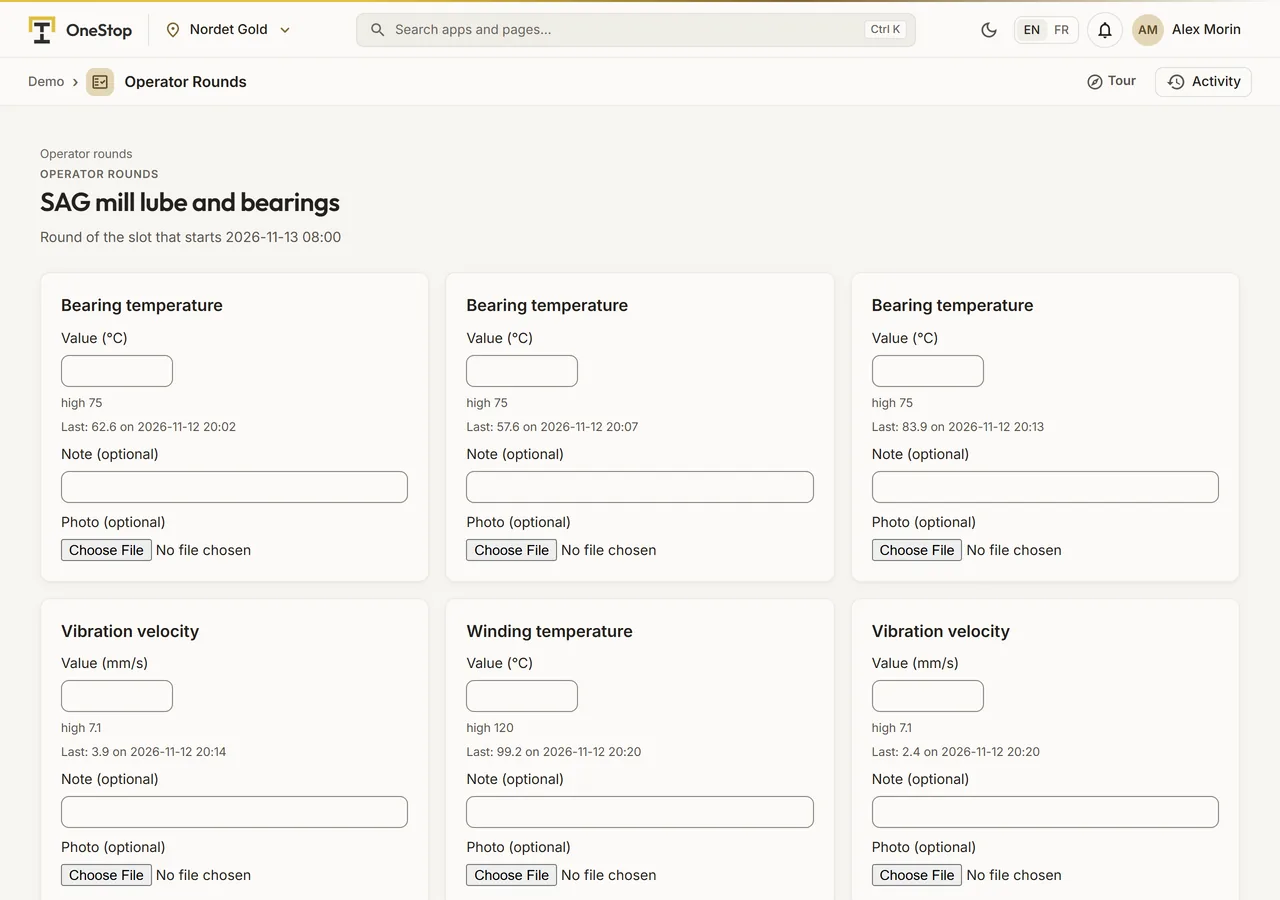
A round of a simulated concentrator being filled: its checkpoints, their limits, the last reading and the PI value
Demo section, simulated data.
02 · Filling a round

The checkpoints in the order of the walk.

Each checkpoint with its input, its limits and its instructions, the last reading and the PI tag’s value now. A value out of its limits shows as it is typed.

  • A note and a photo for each checkpoint.
  • Sent once: a second click or a retry never makes a second round.
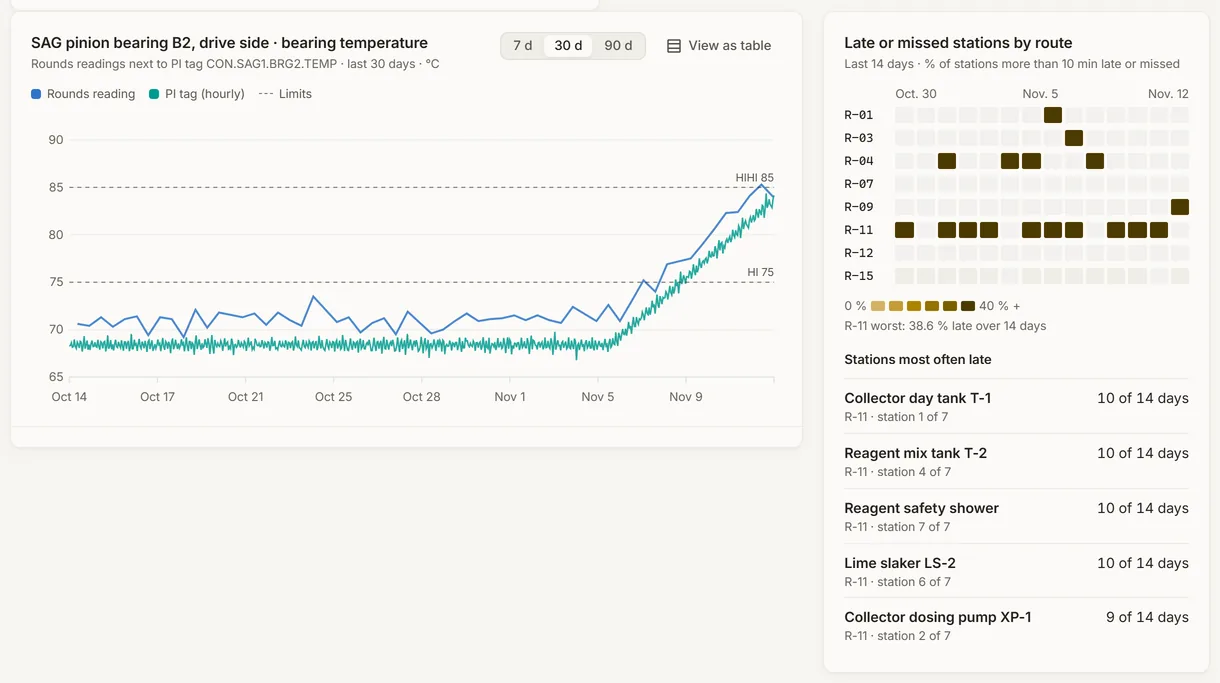
The readings of a checkpoint of a simulated concentrator beside its PI tag, with its limits, and the late or missed stations by route
Demo section, simulated data.
03 · Trends

A reading beside its PI tag, over 7, 30 or 90 days.

The readings of a checkpoint, its limits and the hourly values of its PI tag on one chart, so a slow drift stands out.

  • The late or missed stations of each route over 14 days, as a heat map.
  • The stations most often late, named.
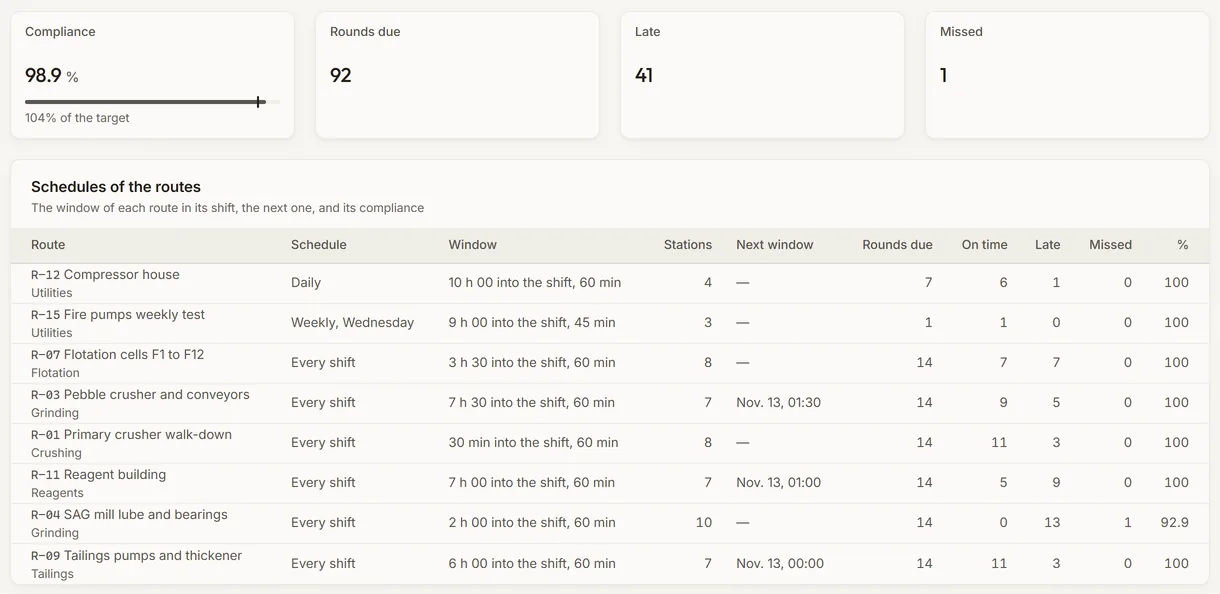
The schedules of the routes of a simulated concentrator and their compliance over 7 days
Demo section, simulated data.
04 · Compliance

Each route’s window, and how often it was kept.

Each route with its schedule, its window in the shift, its stations and its next window, then the rounds due, on time, late and missed over 7 or 30 days.

  • The missed rounds listed, newest first.
  • Every shift, daily or weekly, on your site’s own shifts.
What it does

Everything it does.

  • Routes and checkpoints

    Routes per area, their checkpoints in the order of the walk: a reading with its unit and limits, a check, a choice or a text, with instructions in English and in French.

  • Filling a round

    Each checkpoint with its last reading and the PI tag’s value now, its limit state as the value is typed, a note and a photo; the round is sent once.

  • A follow-up for every reading out of limits

    Opened as the round is sent, with its priority and due time; a new bad reading joins the follow-up still open, which is closed with a note.

  • Schedules and compliance

    Every shift, daily or weekly, on your site’s shifts, each route with its window; each round done, late or missed, route by route over 7 or 30 days.

  • Trends beside PI

    A checkpoint’s readings, its limits and its PI tag’s hourly values on one chart, over 7, 30 or 90 days, or as a table.

  • AI that drafts, a person decides

    A brief of the period’s rounds on request, and a route’s checkpoints drafted from a plain description, reviewed before they are saved.

Standards and integrations

Built on the standards and systems you already use.

Works with

  • FilonRoutes, rounds and readings kept in your Filon, beside the sites, shifts, equipment and PI tags they name.
  • AVEVA PI SystemA checkpoint can name a PI tag of your Filon: its values on the round’s sheet and on the trend.
  • Laptops, tablets and phonesRounds filled in the browser; on a phone, Today opens on your own round.
Who uses it

Made for the people who run the site.

  • Field operatorsWalk the round with the limits and the last reading in hand, and send it from a tablet or a phone.
  • Shift supervisorsSee which rounds are late or missed, and which readings need a follow-up.
  • Reliability and process engineersFollow a reading’s trend beside its PI tag, and catch a slow drift.
  • Operations superintendentsShow round compliance, route by route, week after week.
Questions

What clients ask us.

Do operators need a special device?

No. A round is filled in the browser, on a laptop, a tablet or a phone. On a phone, Today opens on the person’s own round.

Can a checkpoint use our PI tags?

Yes. A checkpoint can name a PI tag of your Filon: the round’s sheet shows its value now, and the trend shows the readings and the tag together.

What if a route changes?

The rounds already done stay as they were: a checkpoint is retired, never deleted, and its old readings keep their limit state.

Can we try it?

Yes. The Demo section has 30 days of rounds on each simulated mine. A round you fill there is checked, not kept.

Your data

Your data in this app.

What it reads, what it writes and who sees it. The whole picture: Security and trust.

  • In your own Filon

    Rounds are kept in your company’s own database, never shared with another company.

  • Encrypted with your key

    Who did a round, the notes, the free-text answers and the photos are encrypted with your company’s own key.

  • The AI never saves

    A route drafted by the AI waits for a person to review it and save it.

The OneStop way

Every app follows the same principles.

What is true of this app is true of every app of TTech OneStop: your data, your people and your language come first.

  • Your data stays yours

    The apps read your data through your own AVEVA CONNECT and write back only their own results, in their own streams. Your existing data is never changed.

  • Nothing to install at the site

    OneStop runs in the browser. Your administrator sets up one connection to your AVEVA CONNECT, once, and every app uses it.

  • Your Microsoft sign-in

    Your people sign in with their Microsoft work account. Your own admins decide who uses which app.

  • Explained, never a black box

    Every score, alert and AI answer shows its reason and where its numbers come from, in plain words.

  • English and French

    Every screen, every message and every report, in the language each person chooses.

  • By the piece

    Subscribe to the apps you need and add others later. Try each one first in the demo, on ten simulated mines.

See it on your own data.

Book a demo on our simulated mines, or tell us how you want to use it on yours.