TTech OneStop · Operations

Weather

The weather of your sites, read for mining work: what the next 48 hours mean for cranes, blasting, roads and people.

The problem it solves

A city forecast is not a mine forecast.

Sites are far from towns and higher up, and work stops on thresholds: gusts for cranes, lightning for blasting, freezing rain for haul roads.

Forecast models often disagree, and nobody knows which one to trust at your site.

  • Demo on ten simulated mines
  • English and French
  • Hosted in Canada
  • Your Microsoft sign-in
Demo clip, simulated data. Open full size
  • 48 hoursThe site’s operations read for the next two days.
  • ThresholdsWind, lightning, heat, cold, freezing rain, snow and visibility: OK, caution or warning.
  • Four modelsCompared with the nearest station and your own sensor in PI.
  • Your sitesEach site of your company, at its own location.
What changes

What changes for your team.

  • A forecast read for the work

    BeforeA city forecast, far from the site and lower down.

    With OneStopThe next 48 hours turned into OK, caution or warning for cranes, blasting, roads and people.

  • The source you can trust here

    BeforeForecast models that disagree, and no way to tell.

    With OneStopFour models measured against your own sensor and the nearest station.

  • The shift planned ahead

    BeforeWork stopped when the wind is already up.

    With OneStopThe thresholds seen hours ahead, on a phone.

How it works

From your data to a decision, in a few steps.

  1. Your sites

    Each site of your company is set up at its own location.

  2. Forecasts compared

    Four forecast models, checked against the nearest Environment Canada station and your site’s temperature sensor in PI.

  3. Read for the work

    The next 48 hours turned into OK, caution or warning for cranes, blasting, roads and people.

  4. Always current

    Charts and tables refreshed through the day, on a laptop or a phone.

Inside the app

The screens your teams use.

Each screen below is from the Demo section of OneStop, on a simulated mine. Ask us for a demo to try them yourself.

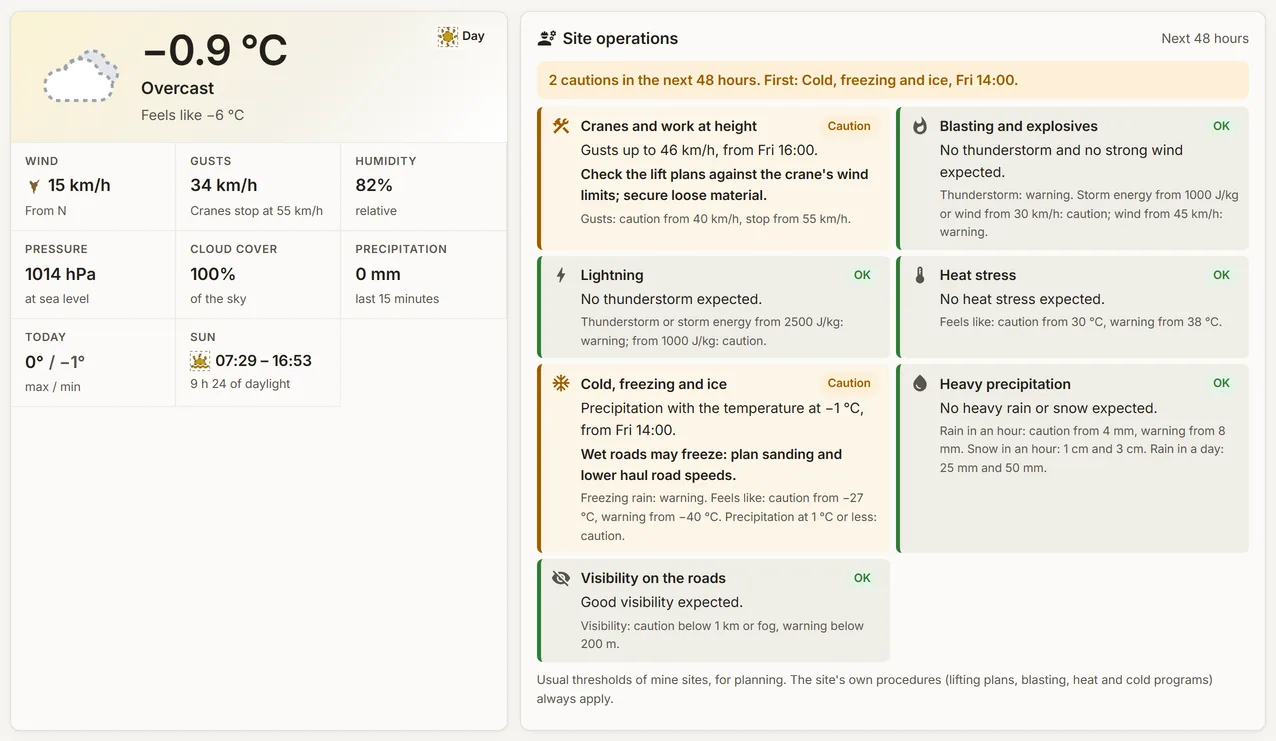
The weather of the simulated mine: current conditions and the site operations panel for the next 48 hours
Demo section, simulated data.
01 · Site operations

The next 48 hours, read for the work of a mine.

Beside the current conditions, each kind of work gets its own verdict: cranes and work at height, blasting, lightning, heat, cold and ice, heavy precipitation and visibility on the roads.

  • OK, caution or warning, with the reason and when it starts.
  • The usual thresholds of mine sites, for planning; your own procedures always apply.
  • A brief of the shift written by the AI, on request.
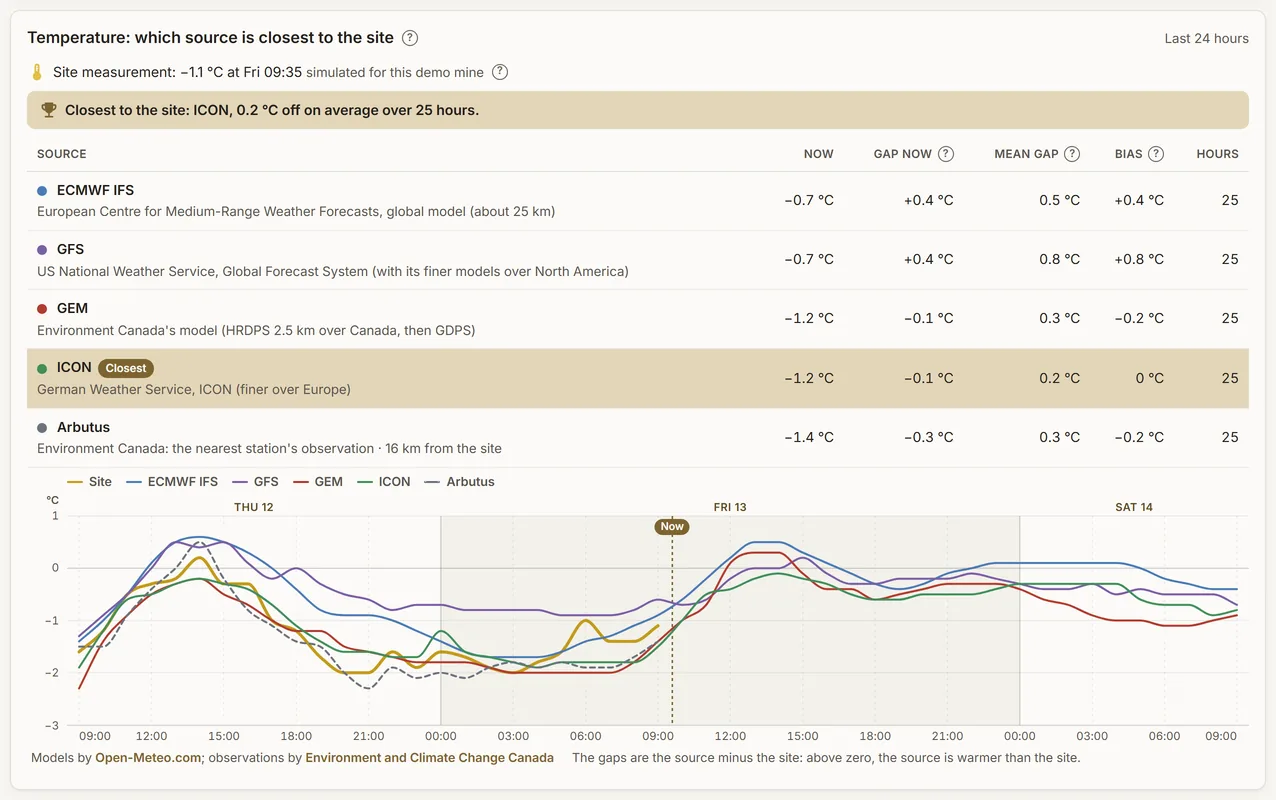
The comparison of the forecast models with the site’s temperature sensor
Demo section, simulated data.
02 · Which source

The forecast that is closest at your site, measured.

Four forecast models and the nearest station compared with your site’s own sensor, hour by hour.

  • The gap now, the mean gap and the bias of each source.
  • The closest source named, so the crews know which one to trust.
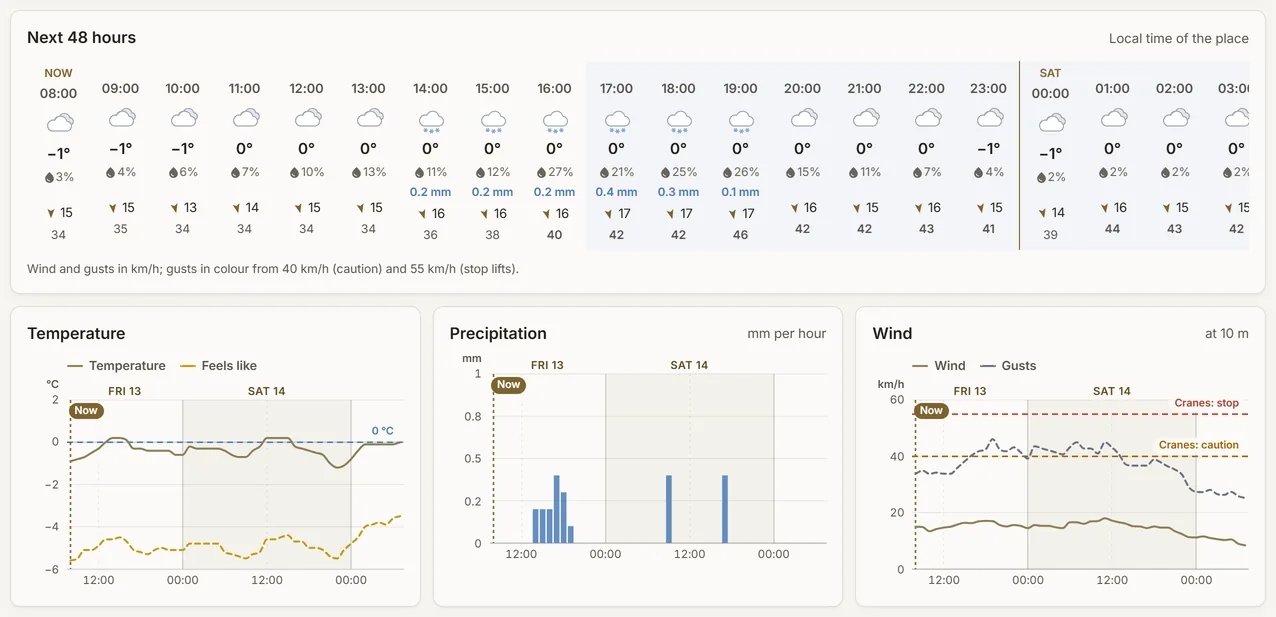
The next 48 hours of the simulated mine: temperature, precipitation and wind
Demo section, simulated data.
03 · Hour by hour

The next 48 hours and the days after.

Temperature, precipitation, wind and gusts hour by hour, with the crane limits drawn on the wind chart.

  • The next 16 days, each with its conditions and its marks.
  • Times in the local time of the site.
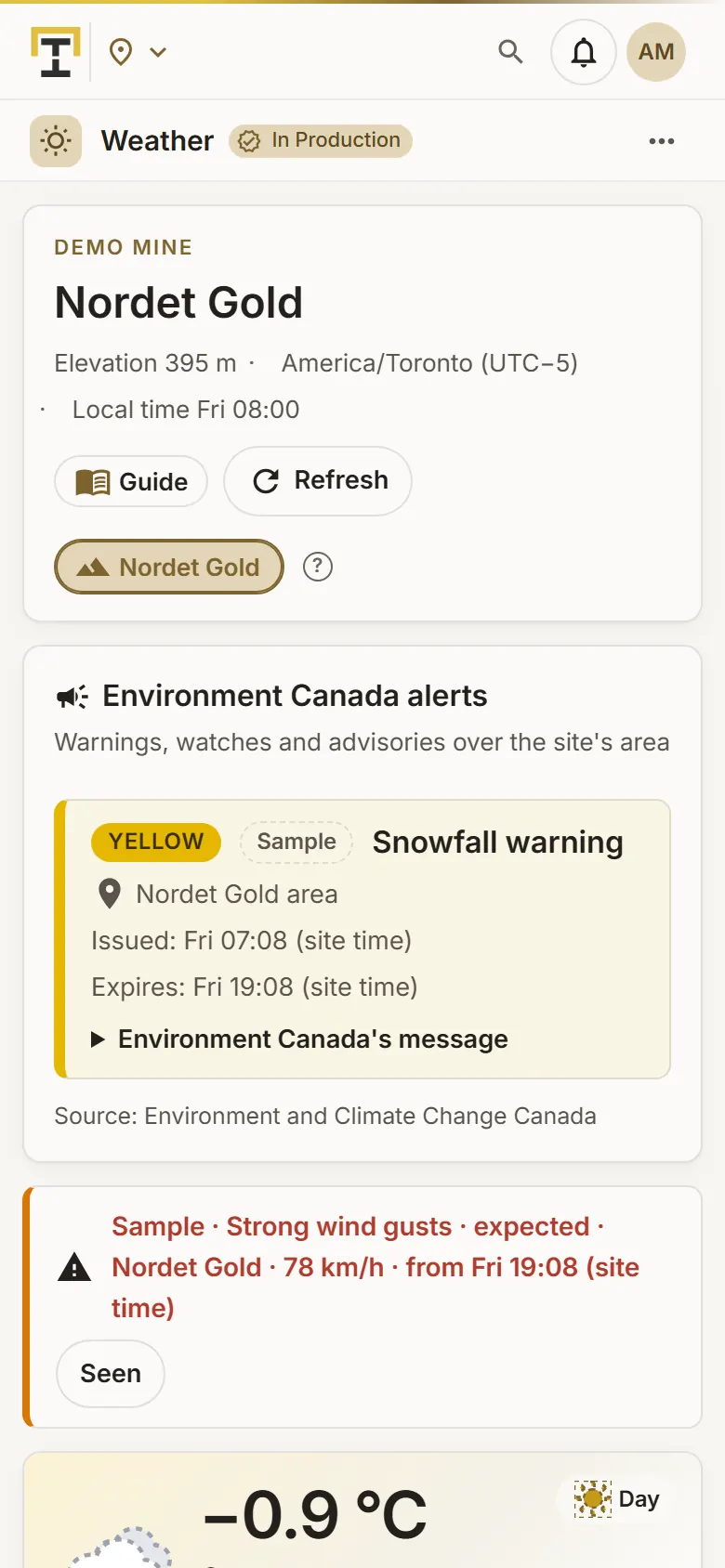
The weather of the simulated mine on a phone
Demo section, simulated data.
04 · On a phone

The site’s weather in a pocket.

The same verdicts and forecasts on a phone, for the supervisor planning the shift.

  • Current conditions first, then the operations of the next hours.
What it does

Everything it does.

  • Site operations, next 48 hours

    Wind and gusts, lightning, heat, cold, freezing rain, heavy precipitation, snow and visibility, each marked OK, caution or warning.

  • Current conditions

    Temperature, wind, gusts, humidity, pressure, cloud cover, precipitation and daylight.

  • Which source is closest

    Four forecast models compared with the nearest Environment Canada station and the temperature sensor of your site in PI.

  • Hourly and daily forecast

    Charts and tables, refreshed through the day.

  • Your sites

    Your company’s sites are set up for you.

Standards and integrations

Built on the standards and systems you already use.

Works with

  • Environment CanadaThe nearest station, in the comparison.
  • Four forecast modelsCompared hour by hour.
  • Your PI System (optional)Your site’s temperature sensor, read through your AVEVA CONNECT.
  • PhonesThe same verdicts in the supervisor’s pocket.
Who uses it

Made for the people who run the site.

  • Operations and supervisorsPlan the shift with the next 48 hours read for the site.
  • Blasting, crane and road crewsSee lightning, gusts and freezing rain coming.
  • Health and safetyHeat and cold marked before they matter.
Questions

Common questions.

Which forecast does it use?

Four forecast models, compared with the nearest Environment Canada station and the temperature sensor of your site in PI, so you see which one is closest at your site.

Does it need our PI System?

No. Weather works without it; your site’s sensor in PI only adds the comparison.

Does it work on a phone?

Yes. The supervisor planning the shift has the site’s weather in a pocket.

Your data

Your data in this app.

What it reads, what it writes and who sees it. The whole picture: Security and trust.

  • No PI needed

    Weather works on its own; your sensor only adds the comparison.

  • Your procedures first

    Thresholds are the usual ones of mine sites, for planning; your own procedures always apply.

  • Your people only

    Microsoft sign-in, seats given by your administrators.

The OneStop way

Every app follows the same principles.

What is true of this app is true of every app of TTech OneStop: your data, your people and your language come first.

  • Your data stays yours

    The apps that read your PI data do it through your own AVEVA CONNECT and write back only their own results, in their own streams. Your existing data is never changed.

  • Runs in the browser

    OneStop runs in the browser. The apps that read PI live share one connection to your AVEVA CONNECT, set up once by your administrator; Alarm Management and System Platform Health also rely on a small agent at the site that only sends data out.

  • Your Microsoft sign-in

    Your people sign in with their Microsoft work account. Your own admins decide who uses which app.

  • Explained, never a black box

    Every score, alert and AI answer shows its reason and where its numbers come from, in plain language.

  • English and French

    Every screen, every message and every report, in the language each person chooses.

  • App by app

    Subscribe to the apps you need and add others later. Try each one first in the demo, on ten simulated mines.

See it on your own data.

Book a demo on our simulated mines, or tell us how you want to use it on yours.