TTech OneStop · Safety and environment

Health and Safety

Near misses reported in a few taps, incidents investigated to their root cause, and every action verified by someone other than its owner.

The problem it solves

Near misses get lost, and actions close without a check.

A near miss told at the end of the shift is soon forgotten, and an investigation on paper often stops at the first cause.

With the incidents, the inspections and the hours worked in separate files, nobody can say whether the site is getting safer.

  • Demo on ten simulated mines
  • English and French
  • Hosted in Canada
  • Your Microsoft sign-in
The health and safety overview of a simulated mine: days without lost time, TRIFR, LTIFR, open incidents and overdue actions
Demo section, simulated data.
  • Near missesReported from a phone in a few taps, by name or anonymously.
  • Root causesThe 5 whys, the fishbone and the causal factors of each investigation.
  • Verified actionsEach action verified by someone other than its owner.
  • Health data protectedAn injured person’s details seen only by the lead, the reporter and your administrators.
What changes

What changes for your team.

  • Near misses on record

    BeforeNear misses told at the end of the shift, then forgotten.

    With OneStopA report in a few taps from a phone, by name or anonymously, and a reviewer who follows it up.

  • Investigations that reach the cause

    BeforeInvestigations on paper that stop at the first cause.

    With OneStopA lead, a team and a due date, the 5 whys, the fishbone and the causal factors, then the actions.

  • Figures you can trust

    BeforeRates rebuilt by hand in a spreadsheet each month.

    With OneStopTRIR, LTIFR and the leading indicators from your incidents and hours worked, against your targets.

How it works

From your data to a decision, in a few steps.

  1. Report

    Anyone of your company with the app reports an observation or a near miss: its kind, the area, a photo and what happened.

  2. Review and act

    A reviewer confirms the kind and the potential severity, gives an action an owner and a due date, and tells the reporter the outcome.

  3. Investigate

    A serious event becomes an investigation: the people involved, the evidence, the timeline, the root causes and the corrective and preventive actions.

  4. Verify and learn

    Each action is verified by someone other than its owner, and the lessons are shared with the company.

  5. Measure

    TRIR, LTIFR, days without lost time and the leading indicators, against the targets of your Safety plan.

Inside the app

The screens your teams use.

Each screen below is from the Demo section of OneStop, on a simulated mine. Ask us for a visit to try them yourself.

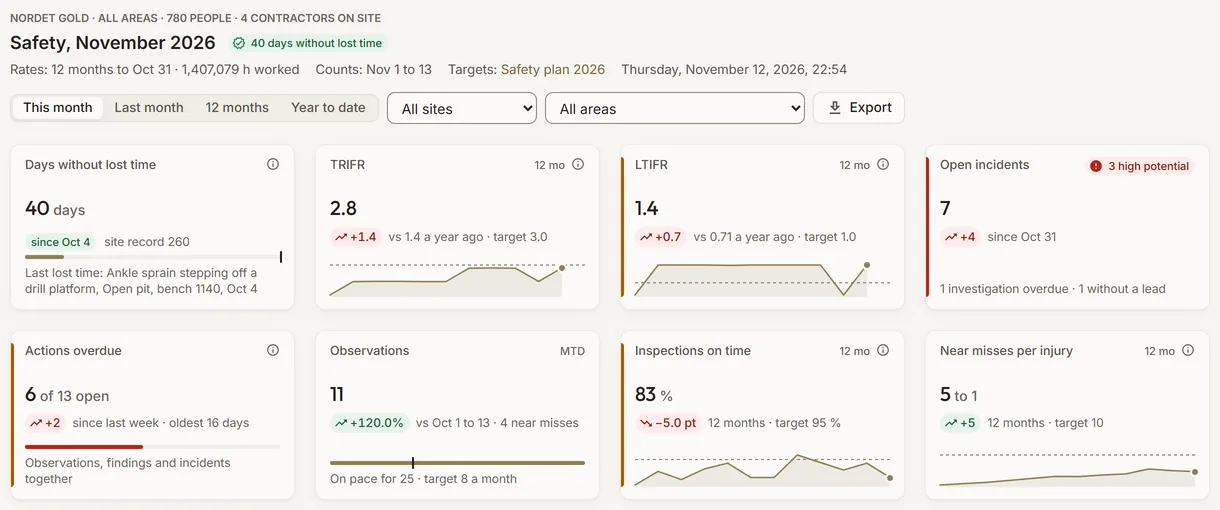
The health and safety overview of a simulated mine: days without lost time, TRIFR, LTIFR, open incidents and overdue actions
Demo section, simulated data.
01 · Overview

The site’s safety on one screen.

Days without lost time and the site’s record, TRIFR and LTIFR on 12 months against a year ago, open incidents, overdue actions, observations, inspections done on time and near misses per injury.

  • By period, site and area, with a CSV export.
  • Without the hours worked, a rate says so: never a made-up number.
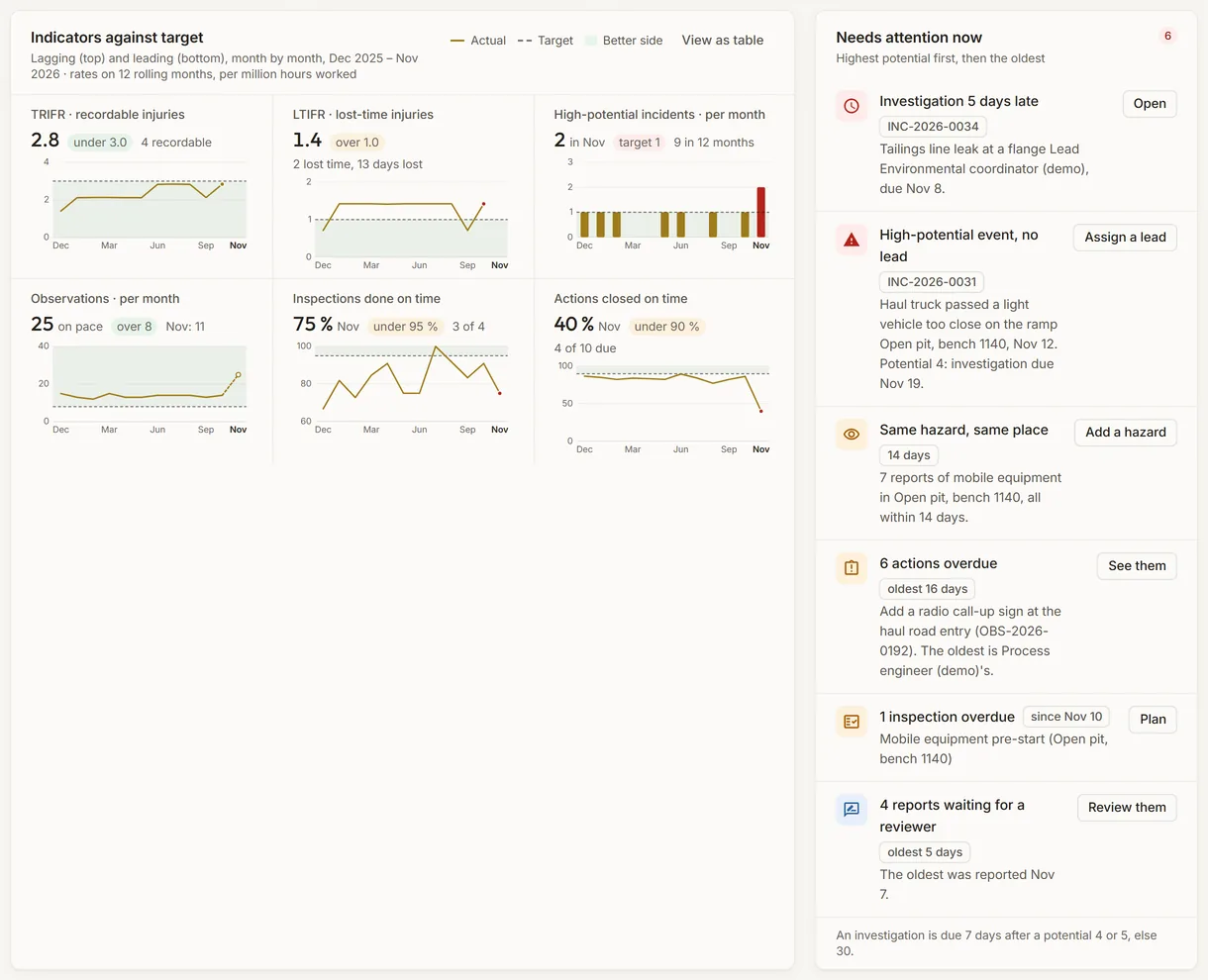
The safety indicators of a simulated mine against their targets, beside what needs attention now
Demo section, simulated data.
02 · Needs attention

What to act on now, highest potential first.

Six indicators month by month against the targets of your Safety plan, beside what needs attention now: a high-potential incident without a lead, a late investigation, overdue actions, a repeat hazard, overdue inspections.

  • Lagging indicators above, leading ones below.
  • One button per line opens what to fix.
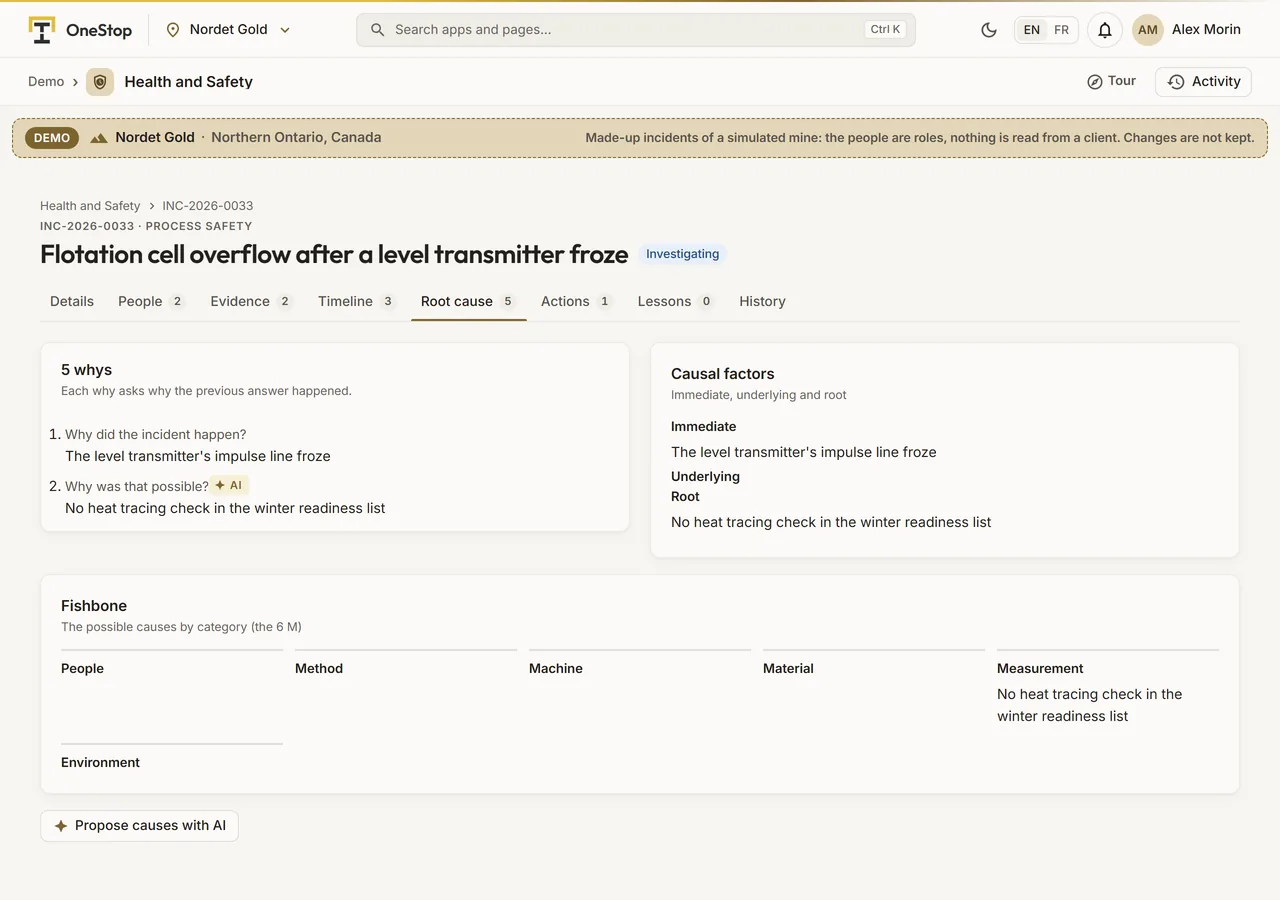
The root cause analysis of a simulated incident: 5 whys, fishbone and causal factors
Demo section, simulated data.
03 · Investigation

From what happened to why it happened.

An incident’s 5 whys, its fishbone by the 6 M and its causal factors, immediate, underlying and root. The AI proposes possible causes; a person accepts each one.

  • The investigation moves on to its actions once a root cause and an action are written.
  • Due 30 days after the event, 7 days when its actual or potential severity is 4 or 5.
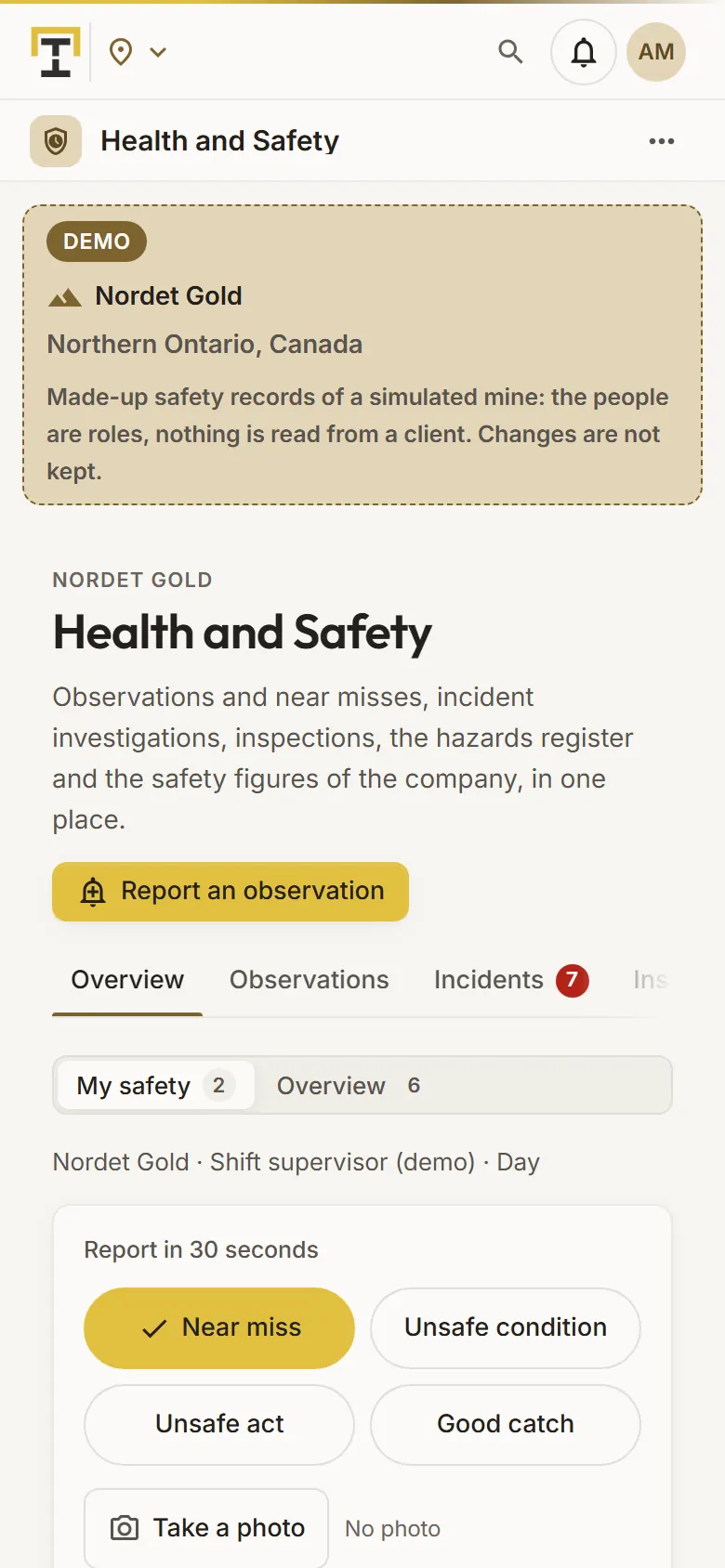
The near miss report of a simulated mine on a phone
Demo section, simulated data.
04 · In the field

Report a near miss in a few taps.

On a phone the app opens on My safety: the kind in four big buttons, a photo, the area and what happened, typed or dictated, then my open actions and my inspections due.

  • Report anonymously: no name is kept, not even in the audit trail.
  • The site overview is one tap away.
What it does

Everything it does.

  • Observations and near misses

    Safe and unsafe acts, unsafe conditions, near misses and good catches, with up to 3 photos. A reviewer confirms, acts and tells the reporter the outcome; the AI may propose the kind, the hazard, the potential severity and an action.

  • Incident investigations

    Ten types of incident, actual and potential severity, a lead and a team, the people involved, the evidence, the timeline, 5 whys, fishbone and causal factors, corrective and preventive actions, and lessons learned.

  • Inspections

    Your checklists and five standard ones, answered yes, no or not applicable, with a score; each no becomes a finding with an owner and a due date. Weekly or monthly repeats.

  • Hazards register

    Each hazard with its area and activity, its 5 × 5 risk before and after its controls, its level in the hierarchy of controls, an owner and a review date.

  • Safety figures

    TRIR, LTIFR, the severity rate and days without lost time from the incidents and the hours worked; observations per 200,000 hours, inspections and actions on time, near misses per injury.

  • One list of actions

    The follow-ups of observations, the inspection findings and the incident actions in one list, overdue first, with the ones waiting for your verification.

Standards and integrations

Built on the standards and systems you already use.

Standards

  • OSHA incidence ratesTRIR and the severity rate per 200,000 hours worked; recordable means medical treatment, restricted work, lost time or a fatality.
  • Hierarchy of controlsEach hazard’s control level, from elimination and substitution to engineering, administrative controls and personal protective equipment.
Who uses it

Made for the people who run the site.

  • Health and safety advisorsReview the reports, lead the investigations and follow the figures against the targets.
  • Shift supervisorsReport from the field and follow their actions and inspections due.
  • Site managersSee what needs attention now and how the site compares with its targets.
  • Company administratorsEnter the hours worked, set the Safety plan and manage the checklists.
Questions

What clients ask us.

Who sees an injured person’s details?

Only the investigation’s lead, the incident’s reporter and your company administrators see the outcome, the days lost or restricted, the note and the incident’s photos. Others see only whether it was a lost-time incident.

Is an anonymous report really anonymous?

Yes. No reporter is stored, not even encrypted, the audit trail does not record it, its times keep only the day, and its photos lose their metadata. Its outcome cannot be told back to its author.

Does it fill in the OSHA or CNESST forms?

No. It computes TRIR, LTIFR and the severity rate from your incidents and the hours worked that your administrators enter per site and month.

Can we try it?

Yes. The Demo section has made-up observations, incidents, inspections and hazards on ten simulated mines, with people as roles.

Your data

Your data in this app.

What it reads, what it writes and who sees it. The whole picture: Security and trust.

  • Health data restricted

    An injured or ill person’s outcome, days and note go only to the lead, the reporter and your administrators; the server blanks them for everyone else.

  • Encrypted with your key

    Descriptions, notes and photos are encrypted with your company’s own key, and every query is limited to your company.

  • Our staff read only

    Our staff see your records only with your access code, never write them and never see the health fields.

The OneStop way

Every app follows the same principles.

What is true of this app is true of every app of TTech OneStop: your data, your people and your language come first.

  • Your data stays yours

    The apps read your data through your own AVEVA CONNECT and write back only their own results, in their own streams. Your existing data is never changed.

  • Nothing to install at the site

    OneStop runs in the browser. Your administrator sets up one connection to your AVEVA CONNECT, once, and every app uses it.

  • Your Microsoft sign-in

    Your people sign in with their Microsoft work account. Your own admins decide who uses which app.

  • Explained, never a black box

    Every score, alert and AI answer shows its reason and where its numbers come from, in plain words.

  • English and French

    Every screen, every message and every report, in the language each person chooses.

  • By the piece

    Subscribe to the apps you need and add others later. Try each one first in the demo, on ten simulated mines.

See it on your own data.

Book a demo on our simulated mines, or tell us how you want to use it on yours.