TTech OneStop · Reliability

System Platform Health

Your AVEVA System Platform watched like your PI System: a Galaxy, a platform or an engine in trouble, told in plain words.

The problem it solves

The SCADA layer fails quietly.

An engine off scan, a platform out of memory or a failover at night: System Platform can lose data long before anyone opens the IDE.

The PI System and the Galaxy are watched by different people with different tools, so the link between them is nobody’s.

  • Demo on ten simulated mines
  • English and French
  • Hosted in Canada
  • Your Microsoft sign-in
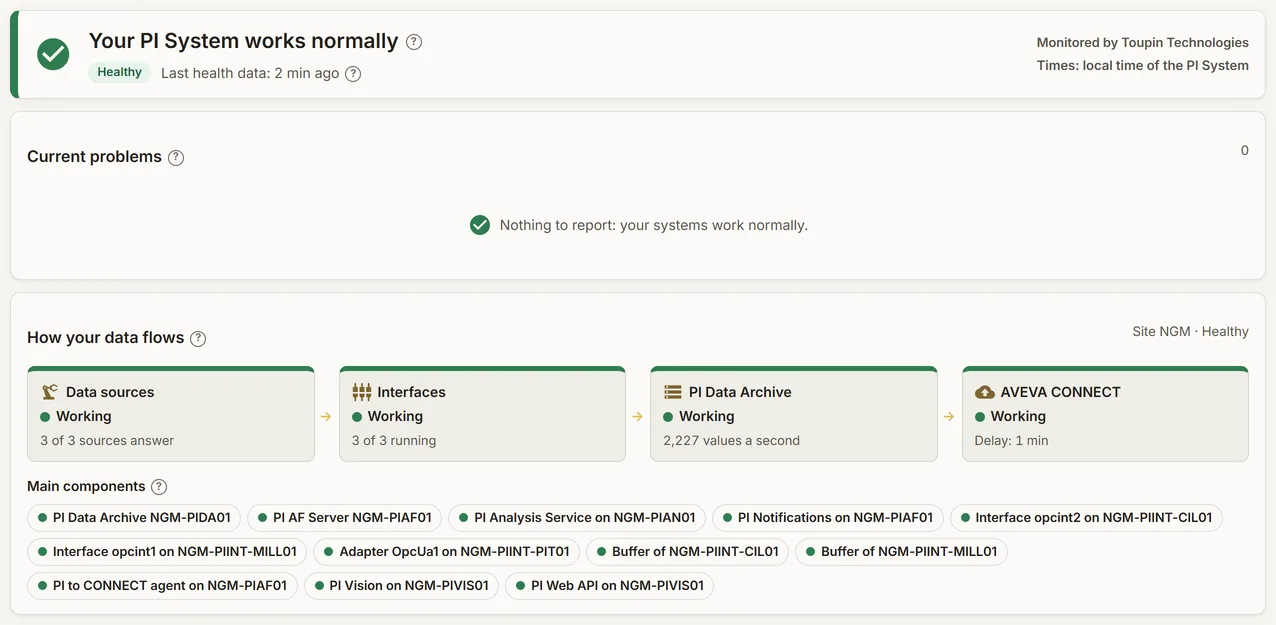
The status of a simulated site in OneStop: healthy, its current problems and its recently resolved ones
Demo section, simulated data.
  • GalaxyPlatforms, engines and IO objects, watched together.
  • Read onlyThrough the Galaxy’s own OPC UA server, encrypted by default.
  • One incidentA Galaxy down raises one problem, not a storm of alerts.
  • With PIThe same page as your PI System’s health.
What changes

What changes for your team.

  • Problems found first

    BeforeUsers find out that data stopped.

    With OneStopAn engine off scan or a platform in trouble shows as a problem in plain words.

  • One view of the chain

    BeforeThe Galaxy and PI watched apart.

    With OneStopFrom the Galaxy to PI to your AVEVA CONNECT, on one page.

  • No alert storms

    BeforeA platform down sends dozens of alarms.

    With OneStopOne incident for the Galaxy or platform, with what it affects.

How it works

From your data to a decision, in a few steps.

  1. TTech PI Health at the site

    The service that watches your PI System can also read each Galaxy, through its OPC UA server.

  2. Read only, encrypted

    Signed and encrypted by default; nothing is trusted automatically.

  3. Into your PI System

    The health values become PI points that reach OneStop through your AVEVA CONNECT.

  4. Problems in plain words

    OneStop turns them into problems, incidents and service levels.

Inside the app

The screens your teams use.

Each screen below is from the Demo section of OneStop, on a simulated mine. Ask us for a visit to try them yourself.

The status of a simulated site: healthy, with its current and recently resolved problems
Demo section, simulated data.
01 · Status

The state of the site, in one sentence.

A banner says whether everything is healthy, then the current problems in plain words and the ones recently resolved.

  • A help mark on every figure.
  • Times in your PI System’s time zone.
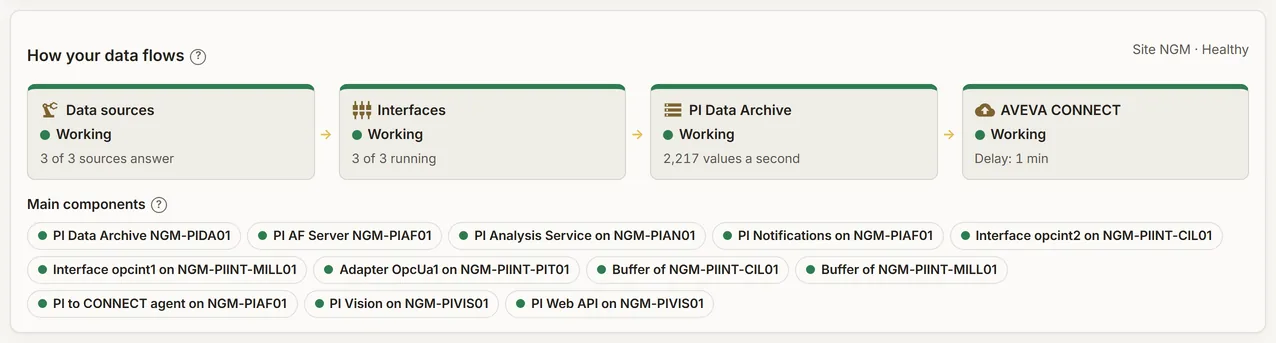
How the data of a simulated site flows, with the state of each component
Demo section, simulated data.
02 · Data flow

How your data flows, from the source to your AVEVA CONNECT.

The main components of the site and the path of the data, each with its state.

  • The weak link shows where the data stops.
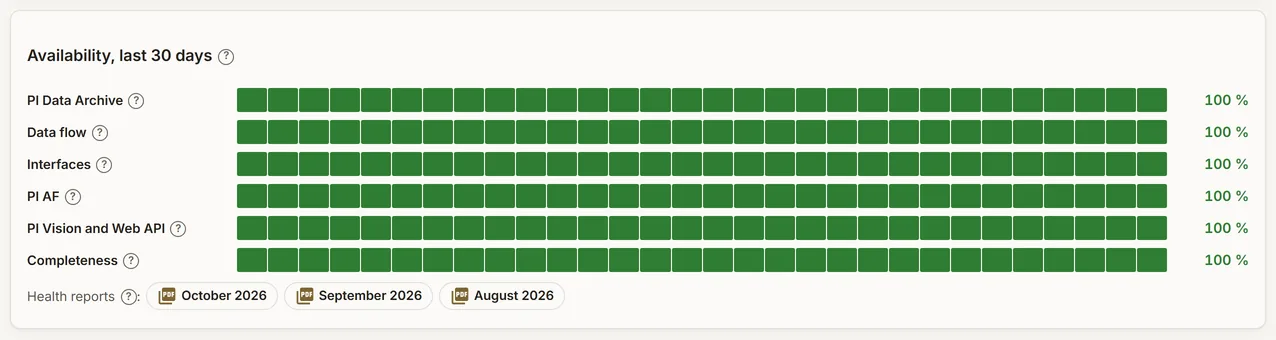
The availability and operations figures of a simulated site
Demo section, simulated data.
03 · Service levels

Availability and operations figures, month after month.

The availability of the site and the operations figures behind it.

  • For the monthly review with your IT and OT teams.
What it does

Everything it does.

  • The Galaxy

    Reachable or not, response time, platforms, engines and objects off scan, failovers, last deployment, OPC UA server version, security mode and certificate days left.

  • Platforms

    On scan, CPU, memory, disk, network link, engine failure, restart needed and store-and-forward.

  • Engines

    Scan load and overruns, quarantine, checkpoint, store-and-forward and redundancy.

  • IO objects

    The connection status of each IO object.

  • Problems in plain words

    Rules that turn the values into problems; a Galaxy or a platform down raises one incident.

  • Follows your changes

    A redeploy is detected and the objects are found again by themselves.

Standards and integrations

Built on the standards and systems you already use.

Works with

  • AVEVA System PlatformEach Galaxy, through its own OPC UA server (System Platform 2020 and later).
  • TTech PI HealthThe site service of Enhanced PI Monitoring.
  • AVEVA PI System and CONNECTHealth values as PI points, read by OneStop through your AVEVA CONNECT.
Who uses it

Made for the people who run the site.

  • OT and SCADA teamsKnow a platform or an engine is in trouble before the operators do.
  • PI administratorsSee the Galaxy and the PI System on one page.
  • IT and OT managersFollow availability and incidents, month after month.
Questions

What clients ask us.

Does it change our Galaxy?

No. It reads the Galaxy through its OPC UA server, read only, and never writes to it.

Which versions?

System Platform 2020 and later, through the Galaxy’s own OPC UA server. Tell us about your Galaxy and we check it with you.

Is it a separate subscription?

It is part of Enhanced PI Monitoring: the same service watches your PI System and your Galaxy.

Your data

Your data in this app.

What it reads, what it writes and who sees it. The whole picture: Security and trust.

  • Read only

    Nothing is written to the Galaxy.

  • Encrypted by default

    Signed and encrypted OPC UA, nothing trusted automatically.

  • Outbound only

    No inbound port at the site: data leaves through your PI System and AVEVA CONNECT.

The OneStop way

Every app follows the same principles.

What is true of this app is true of every app of TTech OneStop: your data, your people and your language come first.

  • Your data stays yours

    The apps read your data through your own AVEVA CONNECT and write back only their own results, in their own streams. Your existing data is never changed.

  • Nothing to install at the site

    OneStop runs in the browser. Your administrator sets up one connection to your AVEVA CONNECT, once, and every app uses it.

  • Your Microsoft sign-in

    Your people sign in with their Microsoft work account. Your own admins decide who uses which app.

  • Explained, never a black box

    Every score, alert and AI answer shows its reason and where its numbers come from, in plain words.

  • English and French

    Every screen, every message and every report, in the language each person chooses.

  • By the piece

    Subscribe to the apps you need and add others later. Try each one first in the demo, on ten simulated mines.

See it on your own data.

Book a demo on our simulated mines, or tell us how you want to use it on yours.