TTech OneStop · Shift and field

Forms

Your own forms, filled in the field even without the network, reviewed in the office and read by your systems as soon as they are sent.

The problem it solves

Paper checklists are filed, not read.

Pre-start checks, inspections and safety forms are filled on paper or in a generic app, and a bad answer is found days later, if ever.

Nobody knows which forms were not done this shift, and the answers never reach the systems that need them.

  • Demo on ten simulated mines
  • English and French
  • Hosted in Canada
  • Your Microsoft sign-in
The forms of a simulated mine: submissions, forms done on time, overdue now, answers out of range and follow-ups open
Demo section, simulated data.
  • Your formsDesigned by your administrators, with conditions, calculations and repeating groups.
  • OfflineFilled on a phone without the network, with photos and a signature.
  • On scheduleForms due per shift, day or week, and the ones overdue.
  • Your APIEvery submission readable by your systems, and an event as it arrives.
What changes

What changes for your team.

  • Bad answers acted on

    BeforeA hot reading on a checklist, filed and forgotten.

    With OneStopAn answer out of range flagged when it is sent, and turned into a follow-up for the team that owns it.

  • Forms done on time

    BeforeNo way to know which checks were missed.

    With OneStopThe forms due by schedule, filled on time, late or missed, shift by shift.

  • Data that reaches your systems

    BeforePaper forms typed again into other systems.

    With OneStopEvery submission read through the Data API, with an event as soon as it is sent.

How it works

From your data to a decision, in a few steps.

  1. Design

    Your administrators build a form from a template, a blank page or a description given to the AI, then publish it as a version.

  2. Schedule

    A form is due every shift, day or week, for its trucks, crews, conveyors or sites, with reminders.

  3. Fill

    People fill it on the web or on a phone, even without the network; it is sent once the network is back.

  4. Review and use

    Reviewers approve or send back, follow-ups go to the right team, and your systems read every submission through the Data API.

Inside the app

The screens your teams use.

Each screen below is from the Demo section of OneStop, on a simulated mine. Ask us for a visit to try them yourself.

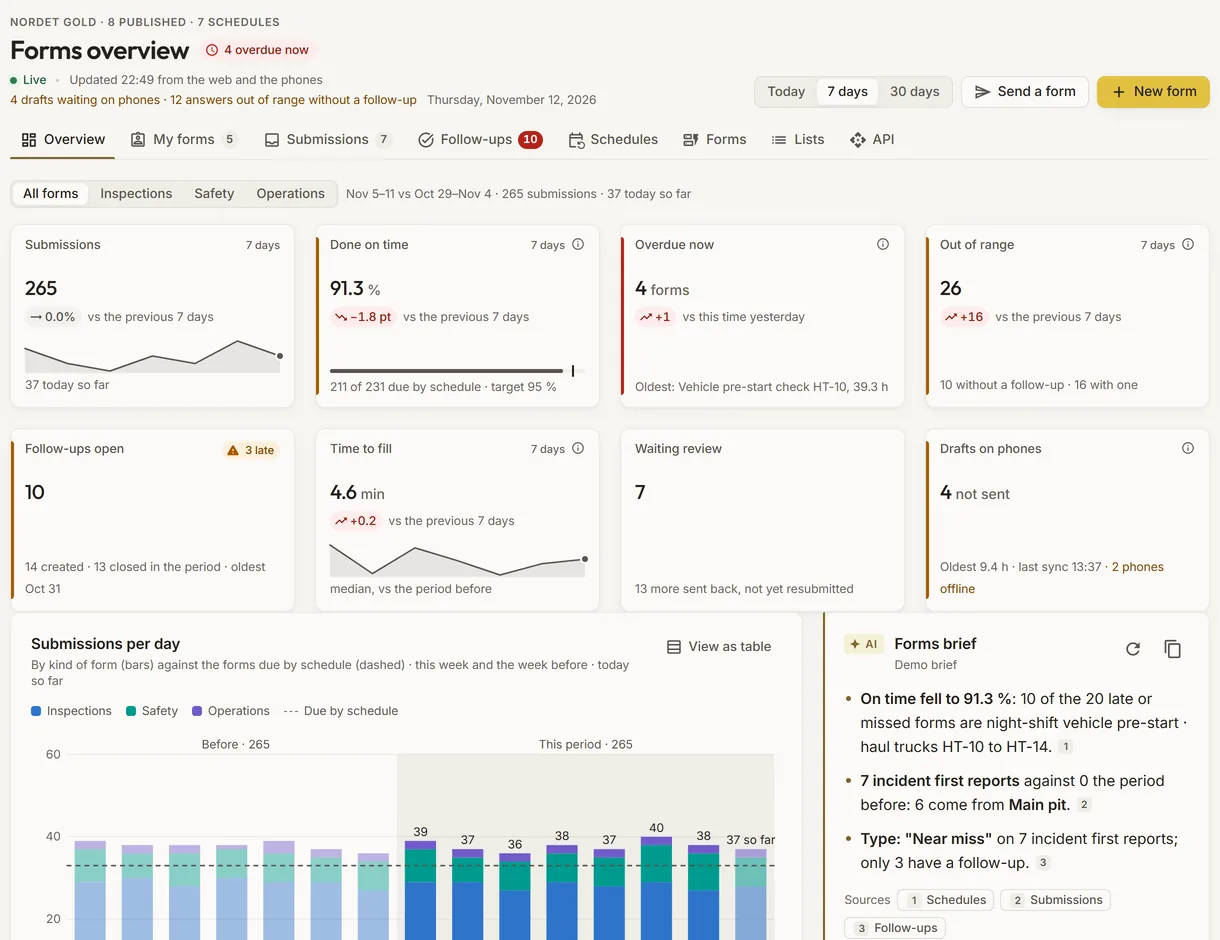
The forms overview of a simulated mine
Demo section, simulated data.
01 · Overview

Every form of the site, at a glance.

Submissions, forms done on time against the target, overdue now, answers out of range, follow-ups open, time to fill, submissions waiting review and drafts still on phones.

  • Submissions per day by kind of form, against the forms due by schedule.
  • A forms brief, with a suggestion of reminders for the schedule late most often.
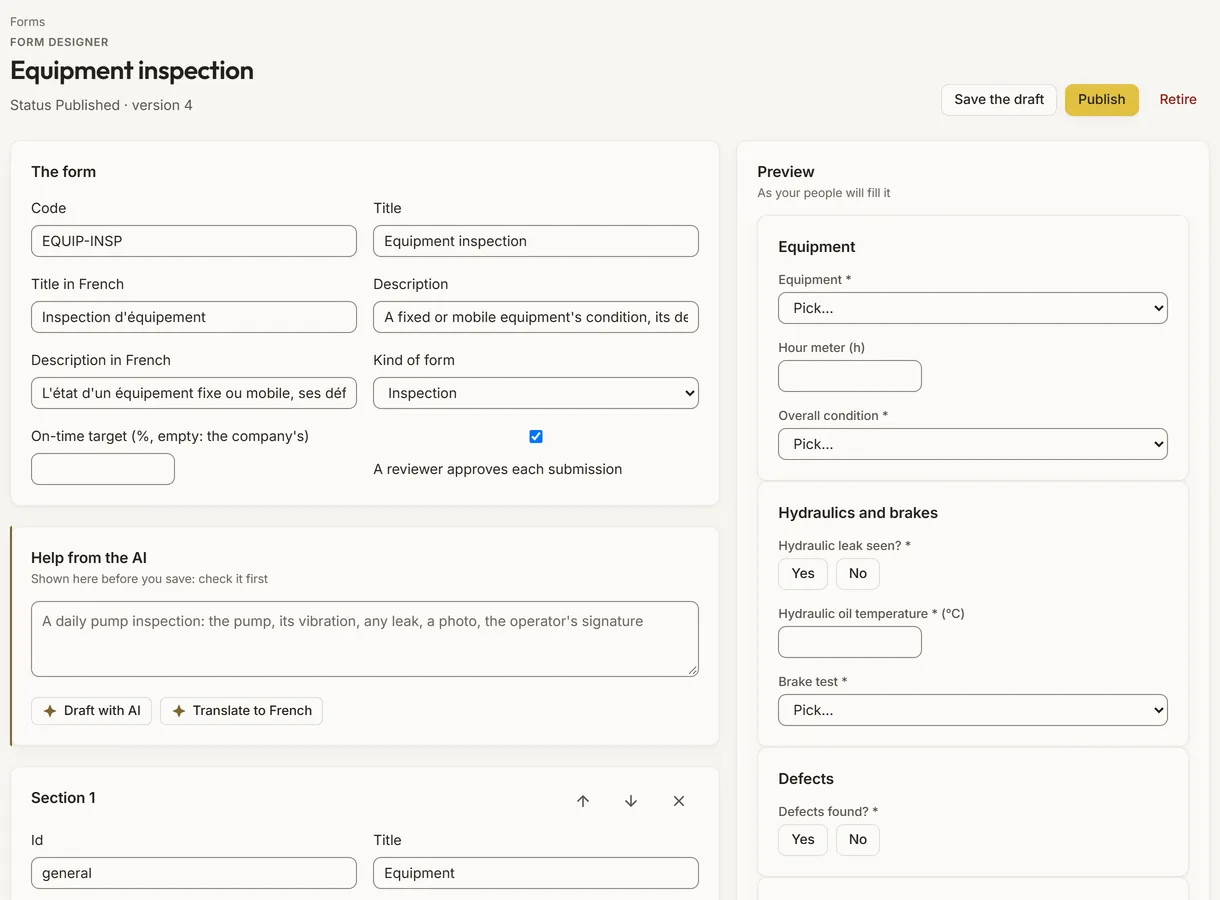
The form designer with a form of the simulated mine and its live preview
Demo section, simulated data.
02 · Designer

Build a form, and see it as your people will.

Sections and fields: numbers, choices, company lists, dates, photos, files, signatures and more, with conditions, warning ranges, calculated fields and repeating groups, and a live preview.

  • Draft a form from a description, or translate it, with the AI.
  • Publishing makes a version; old submissions keep theirs.
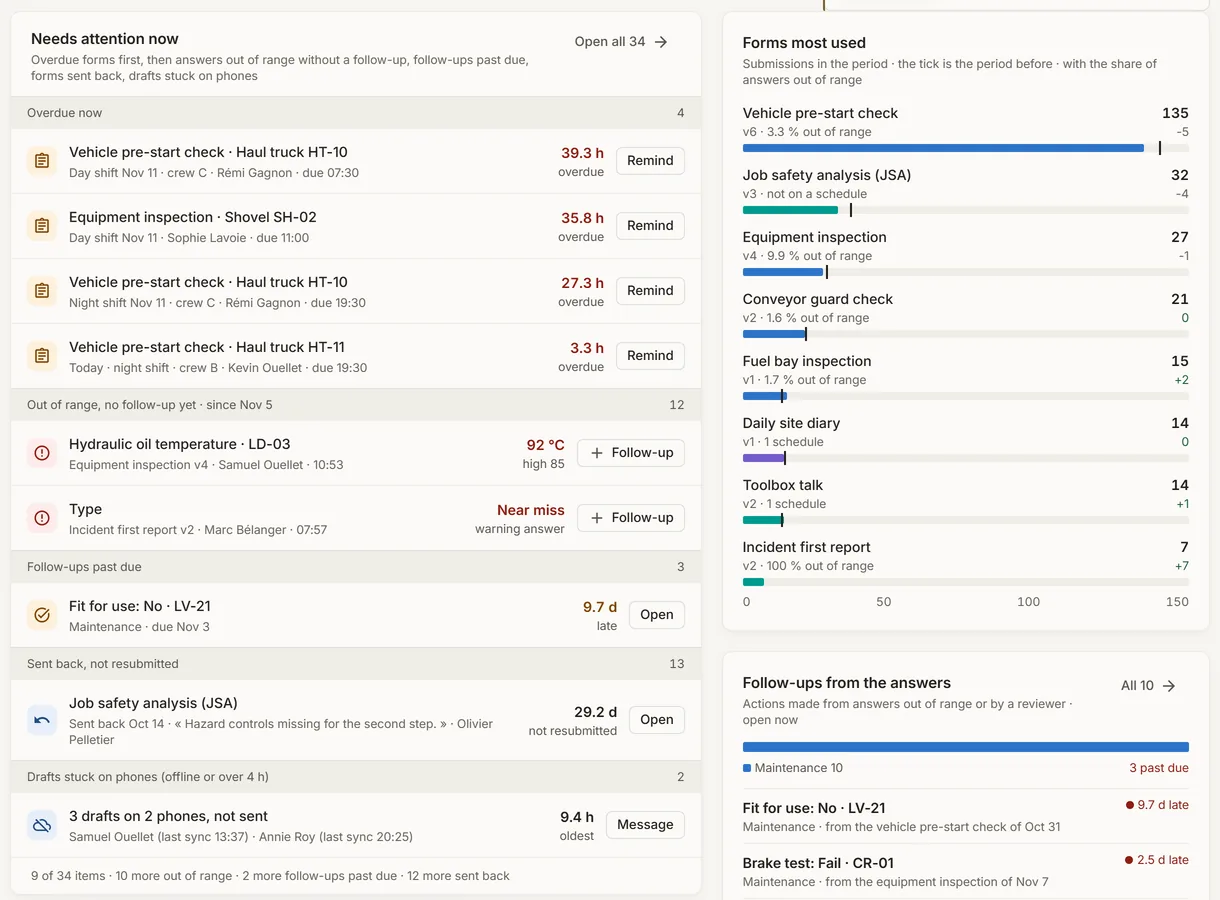
What needs attention in the forms of a simulated mine, with the forms most used and the follow-ups
Demo section, simulated data.
03 · Needs attention

What to act on now.

Overdue forms first, then answers out of range without a follow-up, follow-ups past due, forms sent back and drafts stuck on phones.

  • Remind a person, make a follow-up or open the submission, in place.
  • The forms most used and the open follow-ups beside it.
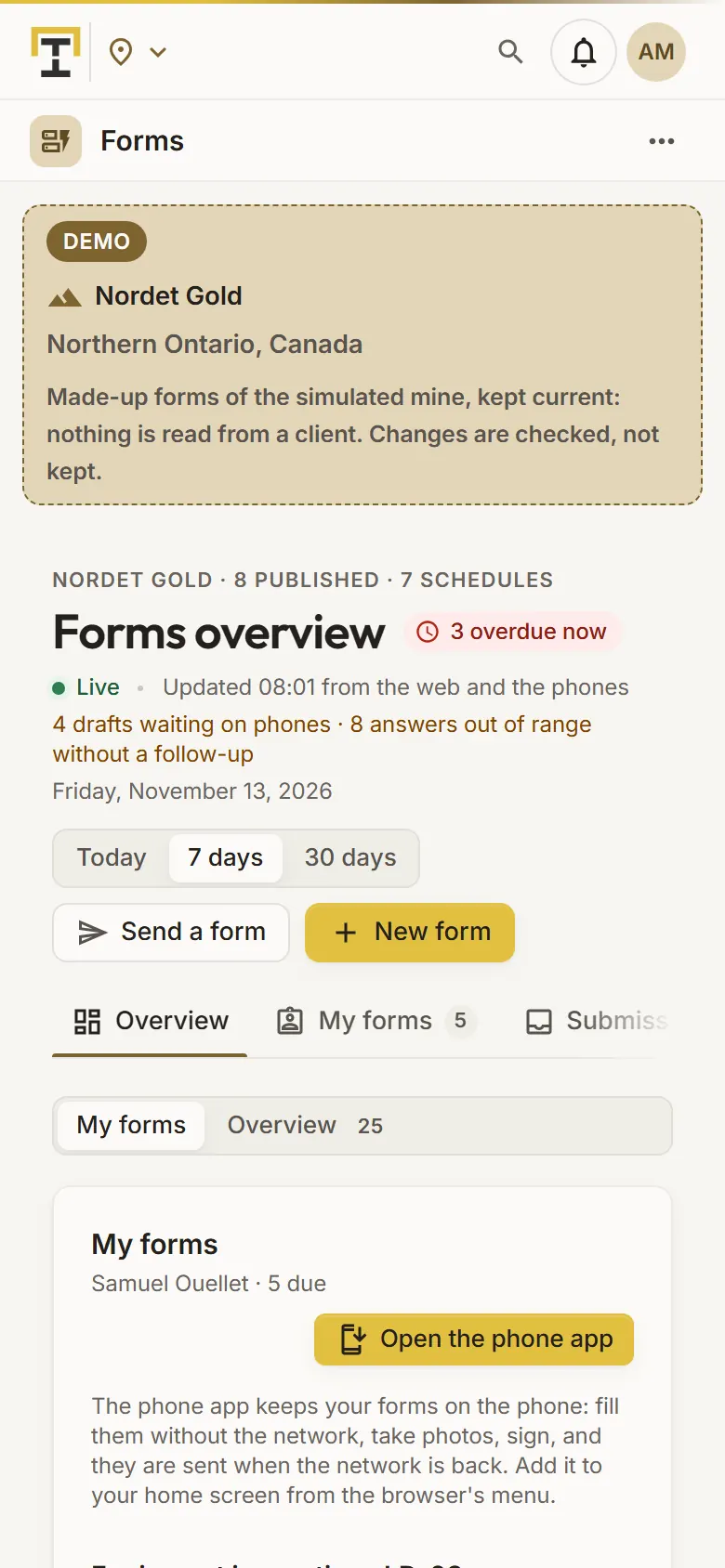
The forms due to a person of the simulated mine, on a phone
Demo section, simulated data.
04 · In the field

The forms due to me, on my phone.

The forms due to the person, overdue first, with their truck or crew and their due time, the ones sent back to send again and the ones sent today.

  • The phone app keeps the forms on the phone: fill without the network, take photos, sign.
  • Sent when the network is back, never twice.
What it does

Everything it does.

  • A form designer

    Sections, many types of fields, help, conditions, validation, warning ranges, calculated fields and repeating groups, with a live preview.

  • Templates and AI

    Start from a template such as an equipment inspection, a job safety analysis or a vehicle pre-start check, or describe the form to the AI; translate it between English and French.

  • Schedules and reminders

    Forms due per shift, day or week for their targets and people, with reminders as push notifications and an on-time target.

  • On the web or a phone

    An installable phone page that works without the network, takes photos and a drawn signature, and sends what waits once the network is back.

  • Review and follow-ups

    Approve, send back with a reason or archive; answers out of range become follow-ups with their team, owner, due date and your work order number.

  • Data API, events and CSV

    Forms and submissions read with a read-only key, the event forms.submission.created as each one arrives, and a CSV export per form.

Standards and integrations

Built on the standards and systems you already use.

Standards

  • OpenAPI 3The forms addresses of the Data API, described for your tools.
  • Standard WebhooksEach event signed, so your endpoint can check that it came from OneStop.

Works with

  • The Data APIForms, versions, submissions and their files, with an API key of the Forms scope, read only.
  • Your systemsAny endpoint subscribed to the event forms.submission.created, or a program that reads the events feed.
  • PhonesAn installable page added from the browser, which keeps the forms on the phone.
Who uses it

Made for the people who run the site.

  • Operators and mechanicsFill pre-start checks and inspections in the field, even without the network.
  • SupervisorsSee which forms are overdue this shift and remind the right person.
  • Safety and maintenance teamsGet the answers out of range as follow-ups, with a due date.
  • IT and data teamsRead every submission through the Data API and its events.
Questions

What clients ask us.

Can people fill forms without the network?

Yes. The phone page keeps each person’s forms and drafts on the phone and sends them when the network is back; a second send is the same submission.

Who designs the forms?

Your company’s administrators design, publish and review; every person with the app fills the forms.

How do our systems get the answers?

Through the Data API, with a read-only key of the Forms scope, and the event forms.submission.created, sent to your endpoint as each form arrives. A CSV export per form too.

Can we try it?

Yes. The Demo section has forms, schedules and submissions for each simulated mine, kept current.

Your data

Your data in this app.

What it reads, what it writes and who sees it. The whole picture: Security and trust.

  • Answers encrypted

    The answers, the names, the notes and the files are encrypted with your company’s own key.

  • In your own Filon

    Forms and submissions are kept in your company’s own database, never shared.

  • Read only from outside

    An API key reads forms and submissions; it can never change them.

The OneStop way

Every app follows the same principles.

What is true of this app is true of every app of TTech OneStop: your data, your people and your language come first.

  • Your data stays yours

    The apps read your data through your own AVEVA CONNECT and write back only their own results, in their own streams. Your existing data is never changed.

  • Nothing to install at the site

    OneStop runs in the browser. Your administrator sets up one connection to your AVEVA CONNECT, once, and every app uses it.

  • Your Microsoft sign-in

    Your people sign in with their Microsoft work account. Your own admins decide who uses which app.

  • Explained, never a black box

    Every score, alert and AI answer shows its reason and where its numbers come from, in plain words.

  • English and French

    Every screen, every message and every report, in the language each person chooses.

  • By the piece

    Subscribe to the apps you need and add others later. Try each one first in the demo, on ten simulated mines.

See it on your own data.

Book a demo on our simulated mines, or tell us how you want to use it on yours.