TTech OneStop · Reliability

Alarm Management

See how your alarm system really performs, measured against ISA-18.2, and know which alarms to fix first.

The problem it solves

Operators drown in alarms nobody measures.

A flood of alarms during an upset hides the one that matters, and a few chattering alarms fill the journal every day.

Without numbers against the standard, nobody knows where to start, or whether things are getting better.

  • Demo on ten simulated mines
  • English and French
  • Hosted in Canada
  • Your Microsoft sign-in
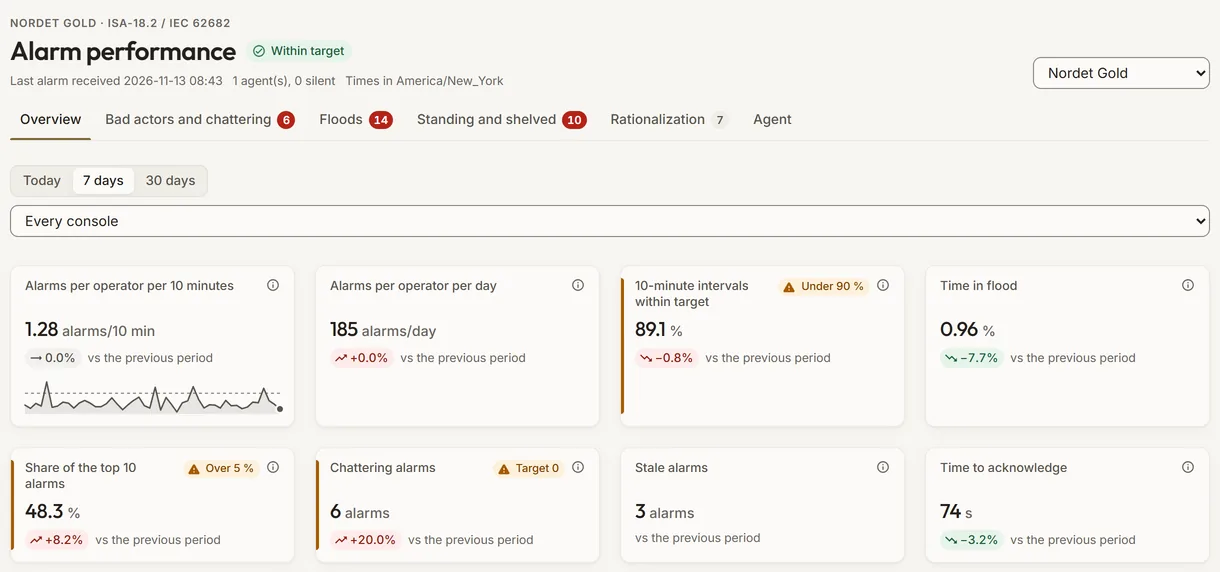
The alarm performance of a simulated concentrator against ISA-18.2: alarm rates, floods, top 10 share, chattering and stale alarms
Demo section, simulated data.
  • ISA-18.2The key indicators of ISA-18.2 and IEC 62682, against their targets.
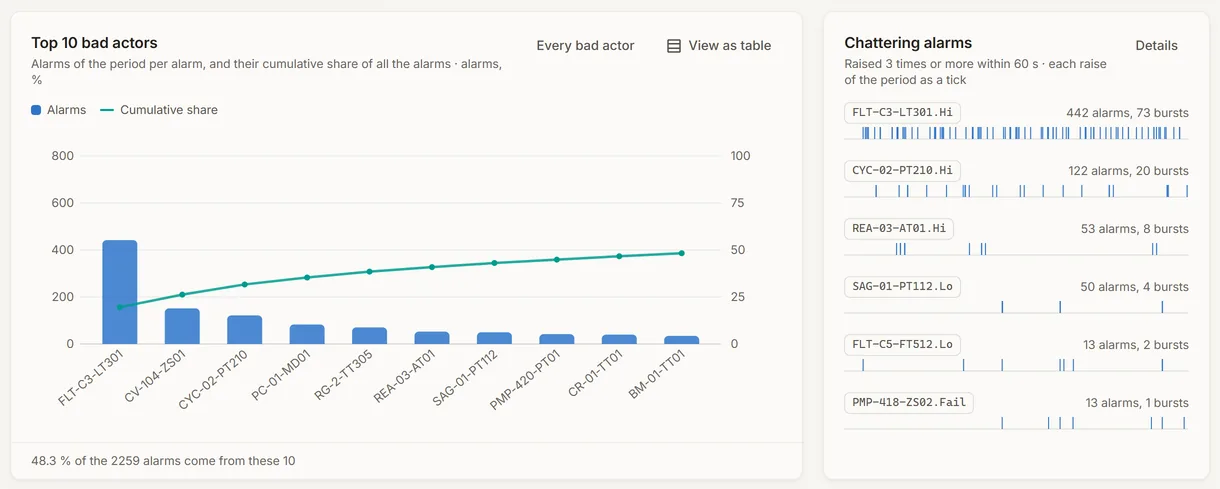
  • Bad actorsThe top 10 alarms, their share and a suggested fix.
  • FloodsEach flood with its start, duration, peak and first alarm.
  • Outbound onlyA site agent reads the alarm journal and never writes to the control system.
What changes

What changes for your team.

  • A number for alarm load

    BeforeComplaints about too many alarms, and no figure.

    With OneStopAlarm rates per 10 minutes and per day, compared with the previous period.

  • Fixes in the right order

    BeforeLong lists of alarms to review, with no priority.

    With OneStopThe top 10 bad actors, their behaviour and a suggested fix.

  • Progress you can show

    BeforeAlarm reviews once a year, then forgotten.

    With OneStopThe same indicators every period, against the targets of the standard.

How it works

From your data to a decision, in a few steps.

  1. An agent at the site

    The TTech Alarm Agent, a small Windows service, reads your AVEVA alarm journal.

  2. Sent out securely

    It sends the alarms to OneStop over outbound HTTPS only, with a key that can only push data.

  3. Measured against the standard

    OneStop computes the indicators of ISA-18.2 and IEC 62682 for each site and console.

  4. Fixed, worst first

    Bad actors, floods, chattering and stale alarms, each with what to look at.

Inside the app

The screens your teams use.

Each screen below is from the Demo section of OneStop, on a simulated mine. Ask us for a visit to try them yourself.

The alarm performance indicators of a simulated concentrator against ISA-18.2
Demo section, simulated data.
01 · Performance

Eight indicators of the standard, against the previous period.

Alarm rate per 10 minutes and per day, time in flood, share of the top 10 alarms, chattering and stale alarms, intervals within target and time to acknowledge.

  • Filter by site, console and period.
  • The last alarm received and the state of each agent, at the top.
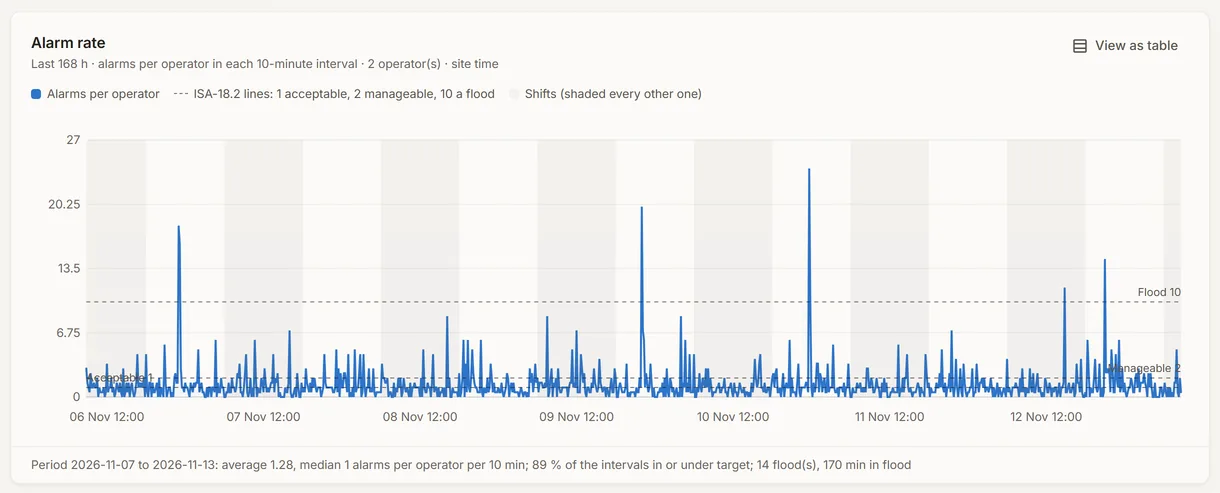
The 10-minute interval figures of the simulated alarm journal
Demo section, simulated data.
02 · 10-minute intervals

How often the operator is overloaded.

The average and median rate per 10 minutes, the share of intervals within target, the floods and the median time to acknowledge.

  • The share of alarms acknowledged with no action.
  • The priority distribution beside it.
The top 10 bad actor alarms of the simulated concentrator, with a suggested fix for each
Demo section, simulated data.
03 · Bad actors

The top 10 alarms, and what to do with each.

Each bad actor with its share and cumulative share, its behaviour, whether the operator acted, and a suggested fix.

  • Chattering and fleeting alarms named.
  • Floods and standing alarms in their own lists.
The state of the simulated site alarm agent and of its alarm journals
Demo section, simulated data.
04 · The site agent

The agent at the site, watched too.

Its version, its state, its last heartbeat, the rows waiting in its buffer and the rows received today, and how far each journal has been read.

  • A network cut or a restart loses nothing and sends nothing twice.
  • An agent gone silent shows at the top of the page.
What it does

Everything it does.

  • ISA-18.2 and IEC 62682 indicators

    Alarm rates per 10 minutes and per day, time in flood, top 10 share, chattering and stale alarms, intervals within target and time to acknowledge.

  • Bad actors

    The top 10 alarms, their share and cumulative share, their behaviour, whether the operator acted, and a suggested fix.

  • Floods

    Each flood with its start, duration, number of alarms, peak in 10 minutes and first alarm.

  • Standing and stale alarms

    The alarms that stay active, listed apart.

  • Priority distribution

    The share of each priority, to compare with the distribution the standard recommends.

  • A site agent you can trust

    Reads the AVEVA alarm stores, sends outbound only, buffers locally, and is watched from OneStop.

Standards and integrations

Built on the standards and systems you already use.

Standards

  • ISA-18.2Management of alarm systems for the process industries: the indicators and their targets.
  • IEC 62682The international standard built on ISA-18.2.

Works with

  • AVEVA System Platform and InTouchThe Alarm DB Logger (WWALMDB), A2ALMDB and Historian alarm events.
  • TTech Alarm AgentA small Windows service at the site, outbound HTTPS only.
  • FilonThe 16 alarm indicators in Filon’s dictionary, your own pages and Ask Filon.
Who uses it

Made for the people who run the site.

  • Control and process engineersFind the bad actors and fix them in the right order.
  • Operations superintendentsFollow alarm load and floods, console by console.
  • Alarm management leadsShow progress against ISA-18.2, period after period.
Questions

What clients ask us.

Does the agent write to our control system?

No. It only reads the alarm journal and sends it out over outbound HTTPS. No inbound port is opened.

Which alarm systems?

AVEVA System Platform and InTouch alarm stores: the Alarm DB Logger, A2ALMDB and Historian alarm events. Tell us about yours.

What if the network goes down?

The agent keeps the alarms in its local buffer and sends them when the link is back, without sending any twice.

Can we try it?

Yes. The Demo section has a simulated concentrator with 30 days of alarm journal.

Your data

Your data in this app.

What it reads, what it writes and who sees it. The whole picture: Security and trust.

  • Outbound only

    No inbound port, no VPN: the agent sends to OneStop over HTTPS.

  • Push only

    The agent’s key can only send alarms; it cannot read anything back.

  • Never writes to control

    The agent reads the alarm journal and nothing else.

The OneStop way

Every app follows the same principles.

What is true of this app is true of every app of TTech OneStop: your data, your people and your language come first.

  • Your data stays yours

    The apps read your data through your own AVEVA CONNECT and write back only their own results, in their own streams. Your existing data is never changed.

  • Nothing to install at the site

    OneStop runs in the browser. Your administrator sets up one connection to your AVEVA CONNECT, once, and every app uses it.

  • Your Microsoft sign-in

    Your people sign in with their Microsoft work account. Your own admins decide who uses which app.

  • Explained, never a black box

    Every score, alert and AI answer shows its reason and where its numbers come from, in plain words.

  • English and French

    Every screen, every message and every report, in the language each person chooses.

  • By the piece

    Subscribe to the apps you need and add others later. Try each one first in the demo, on ten simulated mines.

See it on your own data.

Book a demo on our simulated mines, or tell us how you want to use it on yours.
