TTech OneStop · The platform

Security and trust

Your data in Canada, under your own key, opened to our staff only with your code, and every change recorded where you can verify it.

The problem it solves

Operations data is sensitive, and your security committee will ask.

Where is the data? Who at the supplier can see it? Can it be locked? Who changed what?

A web platform for the mine has to answer each question plainly, and prove it.

  • Demo on ten simulated mines
  • English and French
  • Hosted in Canada
  • Your Microsoft sign-in
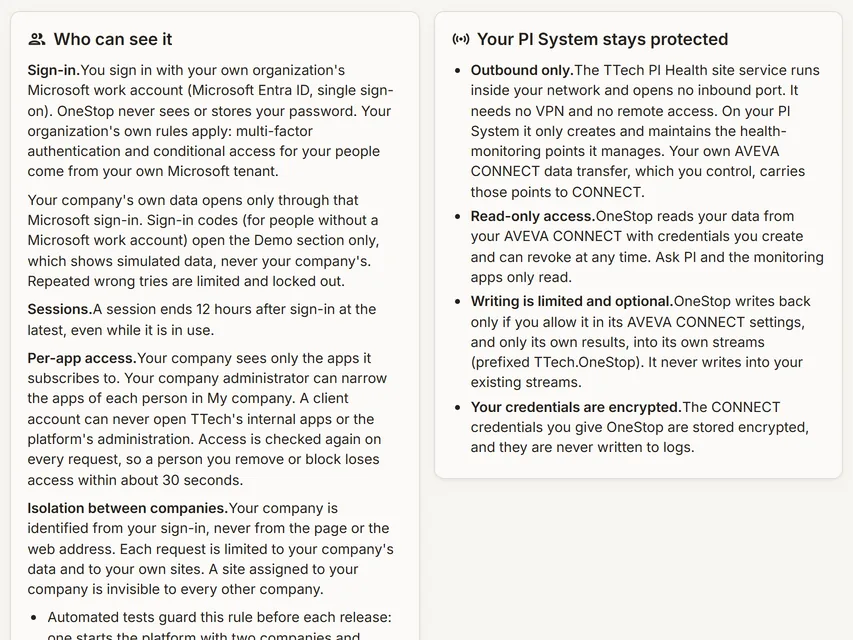
The Security and privacy page of TTech OneStop
Demo section, simulated data.
  • CanadaHosted on Microsoft Azure in Canada, backups in Canada.
  • Your keyA key per company, and a passphrase only you know.
  • Your codeOur staff see your data only with a code you give.
  • Audit trailEvery change recorded, sealed and verifiable.
What changes

What changes for your team.

  • Answers for the questionnaire

    BeforeWeeks of back and forth with the supplier.

    With OneStopA published summary of security and privacy, in English and in French.

  • Control stays with you

    BeforeThe supplier sees everything, always.

    With OneStopYour access codes, your approvals, your passphrase.

  • Evidence for your audits

    BeforeLogs you cannot see.

    With OneStopYour audit trail, filtered, exported, verified and read from your SIEM.

How it works

Four controls, all in your hands.

  1. Your sign-in

    Your people sign in with your organization’s Microsoft work account; your MFA and conditional access apply.

  2. Your company apart

    The company comes from the sign-in, never from the address; automated tests check before each release that no company can reach another’s data.

  3. Your key, your lock

    Personal data and free text are encrypted with your company’s own key; your administrators can lock it with a passphrase.

  4. Your eyes on it

    Access codes, two-admin approvals and an audit trail you can verify.

Inside the app

The screens your teams use.

Each screen below is from the Demo section of OneStop, on a simulated mine. Ask us for a visit to try them yourself.

The Security and privacy page of TTech OneStop
Demo section, simulated data.
01 · Published

Security and privacy, written for your committee.

Where the data is, how people sign in, how companies are kept apart, encryption, backups, privacy and sub-processors, on one page in OneStop.

  • The same text in English and in French.
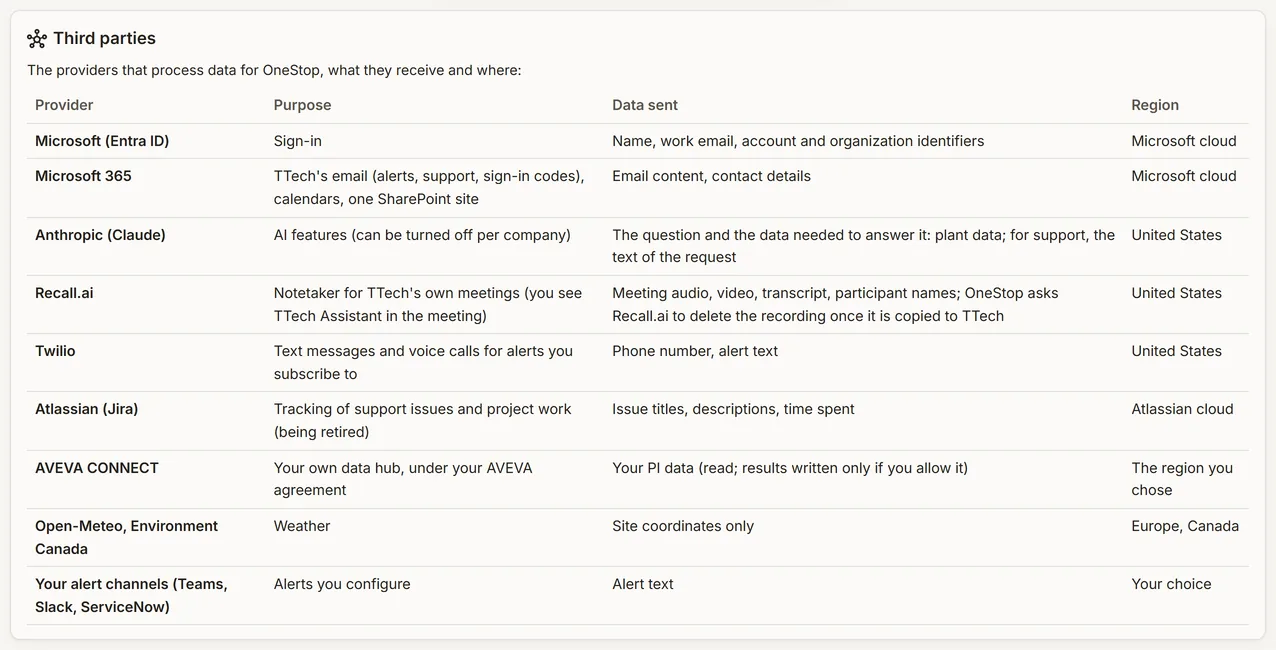
The detail of the Security and privacy page of TTech OneStop
Demo section, simulated data.
02 · In detail

Every answer, with its detail.

Retention periods, the sub-processors and what each one does, and how to make a privacy request.

  • No tracking or advertising cookies.
What it does

Everything it does.

  • Hosted in Canada

    Microsoft Azure in Canada East; off-site backups in Canada Central, and the geo-redundant copy stays in Canada.

  • Your Microsoft sign-in

    No passwords in OneStop; your MFA and conditional access apply; sessions end after 12 hours at most.

  • Your key and your passphrase

    A key per company for personal data and free text. Lock it with a passphrase: while locked, nobody, our staff included, can read that data. We keep no copy of the passphrase.

  • Access codes for our staff

    Your administrator creates a code for a set time and for all apps or some, and revokes it at any time. Each view by our staff is logged and shown to you.

  • Two-admin approvals

    We cannot add people, name administrators, create API keys or change your settings without the approval of one of your administrators.

  • A verifiable audit trail

    Every change in every app: who, what, when and the result. Sealed each day, exported to CSV, verified, and read from your SIEM through the Data API.

Standards and integrations

Built on the standards and systems you already use.

Standards

  • Quebec Law 25 and PIPEDAAccess, correction and deletion requests followed against their deadline; retention periods published.
  • TLS 1.2 and laterAll traffic encrypted, HTTPS only.

Works with

  • Microsoft Entra IDYour organization’s own sign-in, MFA and conditional access.
  • Your SIEMReads the audit trail through the Data API.
  • Your AVEVA CONNECTOne credential your administrator creates and can revoke.
Who uses it

Made for the people who run the site.

  • Security and ITAnswers for the questionnaire, and evidence for audits.
  • Privacy officersRequests followed against their deadline, and incidents reported within 72 hours.
  • Company administratorsCodes, approvals, encryption and the audit trail, in their hands.
Questions

What clients ask us.

Where is our data?

In Canada: Microsoft Azure Canada East, with off-site backups in Canada Central. The geo-redundant copy also stays in Canada.

Can your staff see our data?

Only with an access code your administrator gives, for the time and the apps it allows; each view is logged and shown to you. Monitoring and Support, the services you subscribe to, are visible to our team without a code.

What happens at the end of the contract?

Your data is deleted within 30 days.

Are you SOC 2 or ISO 27001 certified?

Not today. We publish what is in place, and the audit trail gives evidence for your own audits. Ask us for our security answers.

The OneStop way

Every app follows the same principles.

What is true of this app is true of every app of TTech OneStop: your data, your people and your language come first.

  • Your data stays yours

    The apps read your data through your own AVEVA CONNECT and write back only their own results, in their own streams. Your existing data is never changed.

  • Nothing to install at the site

    OneStop runs in the browser. Your administrator sets up one connection to your AVEVA CONNECT, once, and every app uses it.

  • Your Microsoft sign-in

    Your people sign in with their Microsoft work account. Your own admins decide who uses which app.

  • Explained, never a black box

    Every score, alert and AI answer shows its reason and where its numbers come from, in plain words.

  • English and French

    Every screen, every message and every report, in the language each person chooses.

  • By the piece

    Subscribe to the apps you need and add others later. Try each one first in the demo, on ten simulated mines.

See it on your own data.

Book a demo on our simulated mines, or tell us how you want to use it on yours.